8 Best Focus Techniques for Remote Workers in 2026
8 Best Focus Techniques for Remote Workers in 2026
Remote work has its perks, but staying focused can be tough. With distractions everywhere - like switching between apps 1,200 times a day or losing 23 minutes to refocus after interruptions - productivity takes a hit. This article shares eight practical focus techniques to help remote workers reclaim their time and energy:
- Use Focusmo’s Pomodoro Timer: Break tasks into 25-minute sessions with distraction blockers for better focus.
- Deep Work Blocks: Block distractions and dedicate time for uninterrupted work.
- Hourly Check-Ins: Track progress hourly to refocus and stay on task.
- Time Blocking: Schedule tasks in chunks to reduce decision fatigue and interruptions.
- Design Your Workspace: Create a dedicated, distraction-free work area.
- Movement-Based Breaks: Reset your mind with short physical breaks to boost energy.
- Monitor Activity Data: Use tools to track productivity patterns and improve focus.
- Shutdown Rituals: Establish end-of-day habits to separate work from personal life.
These methods not only improve focus but also help manage challenges like ADHD, distractions, and burnout. Tools like Focusmo and macOS features can make implementing these strategies easier. Start small - try one or two techniques - and fine-tune them to fit your work style.
1. Use Focusmo's ADHD-Friendly Pomodoro Timer
Effectiveness in Managing Distractions
Focusmo's Pomodoro timer is designed to eliminate distractions during its 25-minute work sessions by blocking access to distracting websites. This isn't just about relying on your willpower - it creates a technical barrier to help you stay focused. For remote workers, where distractions are just a click away, this feature can save you from losing hours to mindless scrolling.
The timer also transforms abstract time into a tangible countdown, making it easier to stay on task. Research has shown that structured, brief breaks help people maintain focus and reduce fatigue compared to taking random breaks. If unrelated thoughts pop up during a session, jot them down for later instead of letting them derail your current task. This structured approach helps tackle some of the unique challenges associated with ADHD.
Support for ADHD-Specific Challenges
The 25-minute work sessions, paired with regular breaks, offer a manageable way to start tasks and stay engaged, which can be particularly helpful for those with ADHD. The frequent breaks and clear endpoints reduce the anxiety and inertia often associated with large projects. Sanjana Gupta, a health writer at Verywell Mind, highlights this benefit:
"People with ADHD and learning disabilities may find the technique helpful for dealing with specific challenges, such as difficulty initiating tasks and maintaining focus".
For those who find 25-minute intervals too long, shorter sessions - like 15 minutes of focus followed by a 10-minute break - can work just as well to maintain engagement. This flexibility ensures the method can be tailored to individual needs, helping to keep distractions at bay.
Integration with macOS Tools and Workflows
Focusmo seamlessly integrates with macOS tools like Todoist, allowing you to link focus sessions to specific tasks and monitor your progress. It also takes advantage of macOS features like the Notification Center and "Focus Modes" to control which notifications you see during work periods. This integration ensures smooth syncing across your Apple devices - Mac, iPhone, and iPad - creating a distraction-free environment. These features make it easier to establish consistent, productive routines.
Practical Steps for Remote Workers
Start your day by assigning Pomodoros to your tasks. Use Do Not Disturb mode to block unnecessary notifications and keep your focus intact. Set aside 2–4 extra Pomodoros for tasks that may take longer than expected or for urgent priorities.
During the 5-minute breaks, step away from all screens, including your phone, to give your mind a proper rest. Activities like stretching or taking a short walk can help you recharge. For tasks that seem daunting, try this trick: if it takes less than two minutes, do it immediately. If it’s a larger task, commit to just two minutes of effort to overcome the initial resistance.
2. Set Up Deep Work Blocks with Distraction Blocking
Effectiveness in Managing Distractions
Deep work is all about achieving intense, distraction-free focus that pushes your brain to its limits. One of the biggest hurdles? Distractions. They cause those frustrating mental shifts that derail your flow. That’s where distraction-blocking tools, like Focusmo, step in. These tools act as a digital barrier, keeping you away from time-draining apps and websites. Why does this matter? Because when you switch tasks, a phenomenon called "attention residue" kicks in - your mind lingers on the previous task for up to 20 minutes. By blocking distractions, you create the perfect environment for uninterrupted focus.
Support for ADHD-Specific Challenges
For those with ADHD, staying focused can feel like an uphill battle. The ADHD brain craves dopamine from new and exciting stimuli, making it tough to resist the pull of social media or breaking news. Distraction-blocking tools can help bridge this gap by reducing temptations. Pair these tools with visual timers, and you’ve got a powerful combo to tackle time blindness - the struggle of knowing how much time has passed. Start small with deep work blocks of 15 to 25 minutes. This approach not only makes focus more manageable but also provides the external structure needed to support self-regulation.
Integration with macOS Tools and Workflows
Focusmo takes distraction blocking a step further by syncing seamlessly with macOS Focus Modes. You can create a custom "Deep Work" profile that mutes all notifications except from key contacts. Plus, enabling the "Share across devices" feature means this mode will automatically activate on your iPhone and iPad, keeping you distraction-free across your Apple devices. Want even more automation? Set up triggers so that your Deep Work mode turns on whenever you open your main work app. This layered approach ensures interruptions are kept to a minimum.
Actionable and Practical Implementation for Remote Workers
Dedicating around 75% of your workday to deep work is a solid strategy, leaving room for necessary interruptions. Keep in mind that even top performers typically max out at about four hours of deep work daily. To maintain focus, batch your communications - check emails and Slack at specific times, like 11:00 AM, 2:00 PM, and 4:00 PM. For those nagging thoughts or quick tasks that pop up, keep a notepad handy to jot them down and revisit later. Finally, establish a pre-work ritual to signal your brain that it’s time to focus: straighten up your desk, set your timer, and take three deep breaths. These small steps can make a big difference.
8 REALISTIC Work From Home Tips (For the Easily Distracted)
3. Track Progress with Hourly Check-Ins and Task Visibility
Building on structured focus techniques and streamlined workflows, hourly check-ins offer a way to monitor your progress in real time.
Addressing ADHD-Specific Challenges
For those with ADHD, the concept of time can feel elusive. This "time blindness" makes it hard to gauge how long tasks take. Hourly check-ins help turn time into something more concrete and manageable. By dividing your day into hourly blocks, you create mini-deadlines that keep you focused. At the end of each hour, jot down what you’ve accomplished. This isn’t just about keeping records - it’s about giving yourself a visible sense of progress, which can be incredibly motivating. This method helps create a structure that promotes steady, consistent effort.
Staying on Track Despite Distractions
Let’s face it - distractions are everywhere, and research shows that we’re often our own worst enemies. About half of all workday distractions come from within. Hourly check-ins act as built-in reminders to refocus when your attention starts to drift. One effective strategy is the 50-minute rule: work for 50 minutes, then spend the remaining 10 minutes of the hour on a quick check-in and a movement break. Keep a “parking lot” notepad handy to capture random thoughts during your work session. You can revisit these ideas during your check-in, ensuring they don’t derail your focus.
Leveraging macOS Tools for Better Workflow
Tools like Focusmo make staying on task easier by keeping your current task visible on your Mac screen all day. No more flipping between apps just to remember what you’re supposed to be doing. The app also tracks your activity automatically, logging your app and website usage without interrupting your flow. After each session, you can review this timeline to see how your time was spent. It’s like having a passive tracking system that works in the background, so you can focus on what matters most without the hassle of manual logging.
Practical Tips for Remote Workers
If you’re working remotely, these strategies can refine your focus routine even further. Start by rating your focus from 1 to 5 every hour. Over time, these scores can help you identify patterns - maybe you’re most productive in the morning or find it harder to concentrate after lunch. Use a digital or physical calendar to track these scores and spot trends. Struggling to focus in the first 15 minutes of a work block? Pause and figure out why. It could be fatigue, a vague task, or an outside distraction. Address the issue before diving back in. Lastly, remember that most people can only sustain 1 to 4 hours of deep work each day. The key isn’t working longer - it’s working smarter and staying consistent.
4. Structure Your Day with Time Blocking
Time blocking takes the concept of hourly check-ins to the next level by carving out specific chunks of your day for focused tasks. It treats your work time with the same importance as a client meeting, helping you guard against distractions and stay on track.
Managing Distractions Effectively
Did you know it can take 23 minutes and 15 seconds to recover focus after an interruption? And those constant app toggles - about 1,200 a day - end up wasting nearly four hours every week. Time blocking helps minimize this chaos by reducing task-switching and the lingering distractions that follow. Plus, it eliminates the mental drain of constant decision-making.
In fact, research from Dr. Sahar Yousef at UC Berkeley's Becoming Superhuman Lab showed how powerful time blocking can be. By asking team members to identify 1–3 top priorities each day and protect them with focused time blocks, they saw a 28% boost in productivity and a 42% drop in burnout.
"A 40 hour time-blocked work week, I estimate, produces the same amount of output as a 60+ hour work week pursued without structure." - Cal Newport, Author of Deep Work
Helping with ADHD-Related Challenges
For those with ADHD, time blocking is a game-changer. It creates a clear, visual plan that reduces decision paralysis. Incorporating color-coded blocks - like blue for deep work and red for meetings - makes it easy to see your schedule at a glance, cutting down on decision fatigue. This structure also provides clear start and end cues, which is especially helpful when time feels abstract or hard to manage.
Here’s a tip: follow the 75% Rule. Only schedule 75% of your workday, leaving the other 25% open for unexpected interruptions or transitions. This flexibility keeps your schedule realistic and avoids the frustration of an overly packed day.
Using macOS Tools for Time Blocking
If you’re using a Mac, you’ve got built-in tools that make time blocking even easier. Features like Do Not Disturb or Focus Modes can sync with your calendar to silence notifications during deep work sessions. If you’re on Google Calendar or Outlook, you can integrate them with Slack to automatically update your status (e.g., "In a focus block") based on your schedule. Need stronger boundaries? Apps like Cold Turkey can block distracting websites or apps entirely during your focus times.
Practical Tips for Remote Workers
Remote workers often struggle with blurred lines between home and work. Time blocking helps create those boundaries. Here’s how to make it work:
- Match tasks to your energy levels. For example, schedule deep work like coding or writing between 8:00 AM and 11:00 AM, when your focus is sharpest.
- Use blocks of 60–90 minutes for complex tasks. Shorter sessions rarely allow for meaningful focus.
- Batch communication tasks, like emails or Slack messages, into two 30-minute blocks - say, 11:00 AM and 4:00 PM.
Since 32% of remote workers report their home environment as a major distraction, time blocking can create the mental and visual boundaries needed to stay productive in a flexible work setup.
5. Design Your Workspace for Better Focus
Managing Distractions Effectively
Your workspace plays a key role in setting the tone for focus and productivity. Having a dedicated area for work - even if it's just a specific chair or corner - sends a clear signal to your brain that it's time to get things done. This physical separation is especially important when you consider that 66% of remote workers struggle with distractions at home, and more than half say smartphones are a major culprit.
"A dedicated workspace isn't a luxury; it's a strategic tool. It trains your brain to associate a specific location with focus." – Sachs Center
Adding visual cues, like a desk lamp or a room divider, can reinforce the "work mode" mindset. These subtle changes also help communicate to others in your household that you're busy. For people with ADHD, this setup is even more critical, as it helps reduce both visual and auditory distractions.
Tailoring Your Workspace for ADHD
If you have ADHD, your workspace should strike a balance between simplicity and just enough stimulation to keep you engaged. Noise-canceling headphones and low-level background sounds, like white noise or calming music, can help filter out distractions. Silent fidget tools, such as stress balls or fidget rings, can offer a quiet way to stay focused during tasks like reading or meetings. A visual timer can also help manage time blindness and keep you on track.
"ADHD is not necessarily a deficit in attention, but a deficit in regulating that attention." – Jeffrey James, CNP, Behavioral Health Provider, Cleveland Clinic
Another helpful tool is a "Brain Dump" notepad, where you can quickly jot down intrusive thoughts without losing focus on your current task. Pairing this with a streamlined digital environment ensures your workspace stays as distraction-free as possible.
Leveraging macOS Tools to Streamline Workflow
macOS offers several features to help you create a distraction-free digital workspace. Start by setting up separate browser profiles for work, limiting them to essential bookmarks, so personal tabs stay out of sight. Features like Stage Manager or Spaces allow you to organize your desktop and separate different work tasks, reducing the temptation to multitask.
Keep your Dock simple - limit it to 5–7 essential apps - and position it to maximize screen space. Turn off unnecessary notifications in System Settings, and activate a "Deep Work" Focus Mode to block interruptions. Aligning your digital setup with your physical workspace can amplify your concentration. For instance, position your monitor at eye level and keep your desk free of clutter to minimize distractions and avoid physical strain.
Practical Tips for Remote Workers
A well-designed workspace ties together physical and digital elements to support your focus. Start by positioning your desk near natural light, which can improve your mood and energy. If the view becomes distracting, use blinds or curtains to manage it. Sharing your space with others? A folding screen or bookshelf can create a psychological boundary. Even wearing headphones can signal to those around you that you're in work mode.
For an ADHD-friendly setup, consider creating zones for different energy levels. Use your main desk for deep, focused work during high-energy periods. For less demanding tasks, switch to a standing desk or another area in your home. This approach helps you transition between tasks more smoothly, working with your natural energy patterns instead of against them.
sbb-itb-8245ce4
6. Take Movement-Based Microbreaks
Adding physical movement into your day isn’t just about staying active - it’s a simple yet effective way to reset your mind and recharge your focus.
Support for ADHD-Specific Challenges
For individuals with ADHD, movement can be a game-changer. Physical activity helps regulate brain chemistry by increasing dopamine levels, which plays a key role in sustaining attention. Short bursts of exercise, like a quick walk or a set of jumping jacks, can make it easier to stay focused, even on tasks that feel repetitive or dull. If you’re feeling stuck or hitting a mental block, a quick movement break can help you reset before frustration sets in.
"Even a short burst of exercise can boost dopamine. Just make sure to keep the break short and measurable... Otherwise, you may lose track of time." – Jeffrey James, CNP, Behavioral Health Provider, Cleveland Clinic
It’s important to choose active breaks over passive ones. Scrolling through social media, for instance, can easily stretch a five-minute break into a half-hour distraction. Instead, opt for activities that get your body moving without derailing your workflow - try 25 jumping jacks, a brisk walk, or even folding a small pile of laundry.
Integration with macOS Tools and Workflows
If you’re using macOS, there are built-in tools and apps that can help you stay consistent with movement breaks. Time Out, a free app, dims your screen to prompt "Normal" or "Micro" breaks at scheduled intervals. It even pauses automatically when you step away and resumes when you return, so you won’t be interrupted mid-task. For those who need extra accountability, apps like Cold Turkey’s "Locked Mode" can enforce break schedules.
Pair these tools with macOS’s Focus Mode to silence notifications during work and breaks, giving your brain a chance to recharge. If you struggle with time blindness, visual timers or apps like Healthier can be helpful. Healthier, for example, suggests quick desk exercises and includes a floating progress bar to keep you on track.
Practical Tips for Remote Workers
Try the 25/5 rule: work for 25 minutes, then take a 5-minute movement break. Research suggests it takes about 23 minutes to fully regain focus after an interruption, so these short, intentional breaks can help you maintain momentum. Remote workers who stick to structured breaks often report gaining an additional 4.5 hours of focused time each week.
For longer work sessions, consider a 90/15 rhythm: focus deeply for 90 minutes, then take a 15-minute break for something like a walk or light yoga. If you’re struggling to focus early in your day, pause for a quick physical reset - this can help you identify and address distractions before they throw off your entire morning.
7. Monitor Activity Data to Improve Focus
Keeping track of your work habits can reveal the best times for tackling complex tasks and when it's better to take a break. This process creates a feedback loop that helps you make better decisions about how to use your time. This approach is especially helpful for individuals managing ADHD.
Tools for ADHD-Specific Challenges
For remote workers with ADHD, tools like visual timers and digital trackers can help combat time blindness. These tools also gamify tasks, boosting dopamine levels and making it easier to stay focused. By turning routine tasks into a game, you can maintain motivation and improve your ability to concentrate. As Jeffrey James from Cleveland Clinic explains:
"A visual reminder of time passing can help you stay on track”.
Using macOS Tools and Focusmo for Better Workflow
Focusmo takes this idea further by running automatic app and website tracking in the background. This eliminates the need to manually start and stop timers, which can disrupt your workflow. Instead, the app logs your activity automatically and provides a detailed timeline of how you're spending your time.
Combine this with macOS Focus Modes for a complete productivity system. When you open Focusmo, your Mac can automatically silence notifications and share your "Focus Status" with contacts across all your Apple devices. This integration ensures that your activity data reflects actual periods of focus, not just time spent sitting at your desk.
Practical Steps for Remote Workers
To get started, track your productivity patterns over the course of a week. Log when tasks feel easier and when you struggle to concentrate. You might notice patterns related to your sleep schedule, medication timing, or meals. Use this information to plan your most demanding tasks for when you're naturally at your best.
At the end of each day, take five minutes to review your activity timeline in Focusmo. Look for patterns like dips in focus, high-productivity periods, or frequent distractions. Since 66% of remote workers report struggling with home distractions, having concrete data can help you identify specific time-wasters and set better boundaries to improve your focus.
8. Create Shutdown Rituals for Work-Life Balance
When you work from home, the line between work and personal life can get blurry. Without the clear separation that comes with commuting, many remote workers fall into an "always-on" mindset. This constant connection to work often leads to burnout, with studies identifying it as a major contributing factor. A shutdown ritual can act as a stand-in for a commute, signaling to your brain that the workday is officially over.
Addressing ADHD-Specific Challenges
Just like structured focus techniques help organize your workday, a shutdown ritual helps your brain shift gears into personal time. For individuals with ADHD, making transitions between tasks can be particularly tough. A consistent end-of-day routine provides external cues to ease this process. One effective method is spending five minutes on a simple Daily Review. Ask yourself: What did I accomplish today? What’s my top priority for tomorrow? What can I celebrate today? This practice helps reduce anxiety about unfinished tasks and calms racing thoughts. As the Thriving Center of Psychology explains:
"The act of planning activities decreases the burden on the brain because it frees you from the worry of unfinished tasks".
Using macOS Tools to Support Your Routine
Digital tools can make this transition easier. For example, on macOS, you can automate your end-of-workday process. Go to Settings > Focus > Work and schedule "Work Focus" to turn off at 5:00 PM. Then, activate a "Personal Focus" mode to silence work notifications. By enabling the "Share across devices" feature, these settings will sync seamlessly with your iPhone and iPad. Before shutting your laptop, log out of work platforms like Slack or Teams. And if you need to send an email after hours, use the "Schedule Send" feature in Mail to have it delivered the next morning.
Practical Steps to Reinforce Boundaries
In addition to digital tools, physical actions can help reinforce the boundary between work and personal life. Close all work-related tabs, put away your laptop, and change out of your work clothes. Even small actions like washing your hands or taking a 15-minute walk can signal to your brain that the workday is over. Protecting your personal time isn’t just about balance - it’s also about sustaining your productivity. Research shows that productivity per hour drops significantly when the workweek exceeds 50 hours. By establishing clear boundaries, you’re setting yourself up for better focus and energy during work hours.
Comparison Table
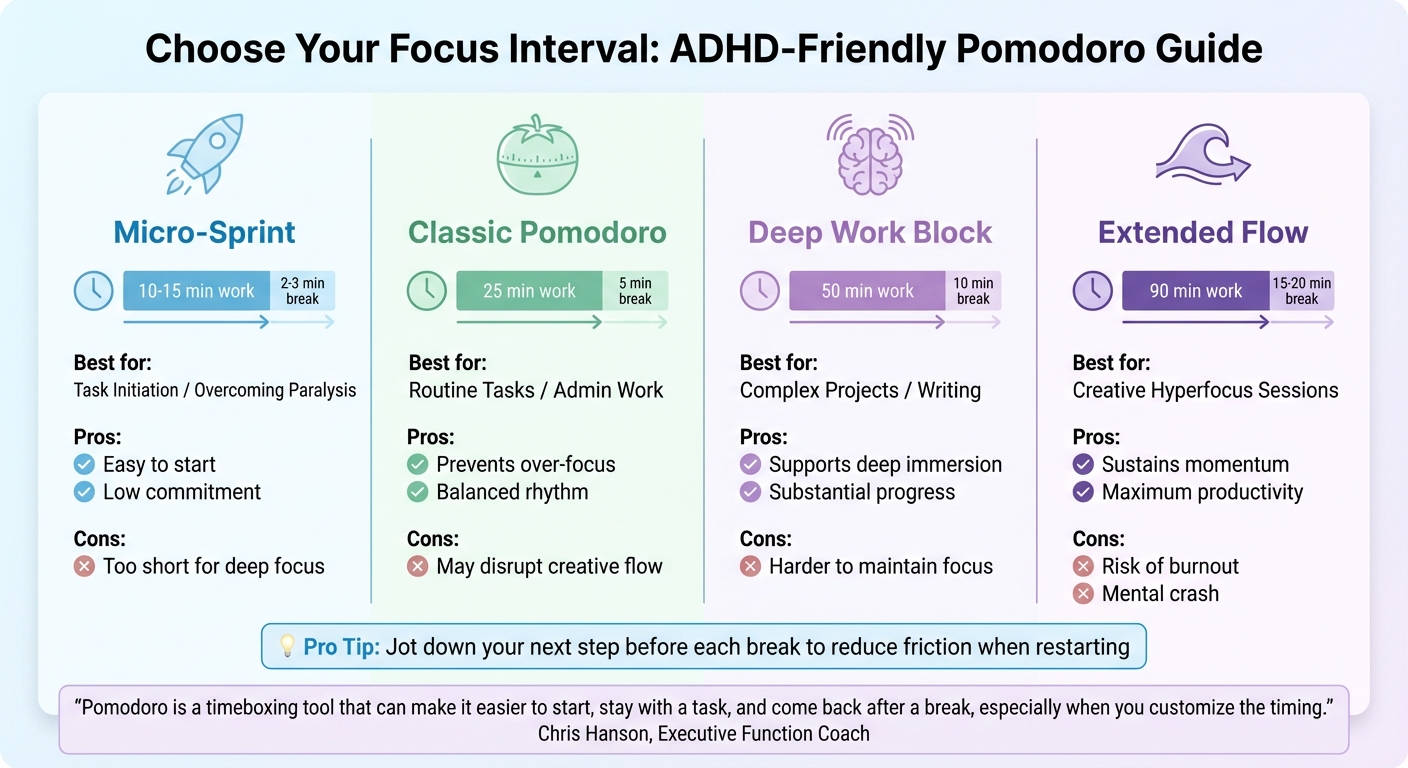
Pomodoro Interval Types for ADHD-Friendly Focus: Comparison Guide
Focus strategies can vary widely, especially for individuals with ADHD. The key is to tailor your Pomodoro intervals to match your task and how your brain responds. Chris Hanson, an Executive Function Coach, highlights the flexibility of this approach:
"Pomodoro is a timeboxing tool that can make it easier to start, stay with a task, and come back after a break, especially when you customize the timing."
The table below breaks down different Pomodoro interval types and their ADHD-friendly applications. For those struggling to begin a task, a Micro-Sprint (10–15 minutes) can make starting feel less overwhelming. Once you're in the groove, a Deep Work Block (50 minutes) supports sustained focus on complex projects. For creative endeavors where you're already in a state of flow, an Extended Flow session (90 minutes) can help you maximize productivity - but watch out for mental fatigue afterward.
| Interval Type | Timing (Work/Break Intervals) | Best Use Case for ADHD | Pros/Cons |
|---|---|---|---|
| Micro-Sprint | 10–15 / 2–3 mins | Task Initiation / Paralysis | Pros: Easy to start. Cons: Too short for deep focus. |
| Classic Pomodoro | 25 / 5 mins | Routine Tasks / Admin | Pros: Prevents over-focus. Cons: May disrupt creative flow. |
| Deep Work Block | 50 / 10 mins | Complex Projects / Writing | Pros: Supports deep immersion. Cons: Harder to maintain focus. |
| Extended Flow | 90 / 15–20 mins | Creative "Hyperfocus" | Pros: Sustains momentum. Cons: Risk of burnout or mental crash. |
Focusmo’s timer allows you to adjust these intervals based on your energy levels and the type of work you're tackling. To keep up your momentum, jot down your next step before each break - this simple habit reduces friction when restarting. By experimenting with these interval strategies, you can fine-tune your Focusmo sessions to better suit your needs and boost your productivity.
Conclusion
Remote work in 2026 demands well-structured systems to re-establish clear work-life boundaries. The eight techniques outlined in this article address major hurdles like constant digital interruptions, home distractions, and the blurred lines between personal and professional life - all of which can lead to burnout.
Focusmo transforms these strategies into practical tools. Its visual timers help counteract time blindness, while hourly check-ins encourage accountability. On top of that, distraction-blocking features protect your ability to stay in the zone.
These tools aren’t just about productivity - they’re designed to support diverse workstyles. For individuals with ADHD, for instance, these features assist with self-regulation and align with the growing emphasis on outcomes rather than hours worked. By syncing deep work sessions with your natural energy peaks, grouping smaller tasks together, and tracking activity data, you could gain back an average of 4.5 hours of focused time every week.
Dr. Sahar Yousef offers a valuable perspective:
"Multitasking is a myth. What you're really doing is switching between tasks. It's almost always more efficient to focus on one task at a time".
Using this insight, try experimenting with your routine. Start by implementing one or two strategies to address your biggest challenges - whether it’s initiating tasks, cutting out digital distractions, or creating clearer work-life boundaries. Techniques like customized Pomodoro timers or end-of-day rituals can help you reclaim uninterrupted focus. Adjust your focus intervals, fine-tune your workspace, and refine your shutdown routine until you find what works best for you. The ultimate aim is to create a system where staying focused becomes second nature.
FAQs
How can I use Focusmo's Pomodoro Timer to stay productive while working remotely?
To get the most out of Focusmo’s Pomodoro Timer, start by setting up a workspace free from distractions and planning your tasks for the day. Break your work into 25-minute focus sessions, assigning each session to a specific task. Open the timer, choose your task, and hit Start to kick things off.
During each session, commit fully to the task - steer clear of emails, messages, or random browsing. If unrelated thoughts pop up, jot them down so you can deal with them later. After each 25-minute session, take a 5-minute break to stretch, grab some water, or just relax. Once you’ve completed four sessions, reward yourself with a longer break of 15–30 minutes to recharge.
At the end of your workday, use Focusmo’s analytics to review your productivity. This feature helps you monitor your progress and tweak your workflow to improve focus and get more done in the future.
How can I set up a distraction-free workspace at home?
To create a workspace at home that keeps distractions at bay, start by carving out a dedicated area for work. Even if it’s just one corner of a room, make it a space reserved exclusively for productivity. Keep it tidy and uncluttered - only keep tools or materials you need for the task at hand close by. Prioritize good lighting, whether it’s natural sunlight or a bright desk lamp, to ease eye strain. And don’t overlook comfort - an ergonomic chair and desk can make a world of difference in maintaining focus. A touch of greenery or a simple piece of artwork can also create a calming vibe without pulling your attention away.
To tackle digital distractions, enable “Do Not Disturb” mode and silence notifications during your work hours. Structure your day with methods like time-blocking or the Pomodoro technique to stay on track. Establishing a morning ritual, even something as simple as brewing coffee or a few minutes of stretching, can help signal the start of your workday and get you mentally prepared. Finally, set clear goals for each task before diving in - this helps you avoid multitasking and ensures you’re working efficiently.
How do short movement breaks improve focus and productivity for remote workers?
Taking short movement breaks works wonders as a "reset" for both your mind and body. Sitting for extended periods slows down blood flow, leading to stiffness, eye strain, and a drop in alertness. Simple activities like stretching, walking, or doing light exercises can counteract this by boosting circulation, increasing oxygen levels, and releasing endorphins. The result? Better mood, sharper mental clarity, and less discomfort from sitting too long. These small breaks also help combat fatigue, keeping you more productive throughout the day.
For those working remotely, setting aside 3–5 minutes every 60–90 minutes for movement can make a big difference. These short breaks not only refresh your body but also re-energize the brain areas responsible for focus and decision-making. When you return to your tasks, you’ll feel sharper and more efficient. Over time, these quick pauses can lead to noticeable gains in productivity and overall well-being.