Ultimate Guide to ADHD-Friendly Workspace Design
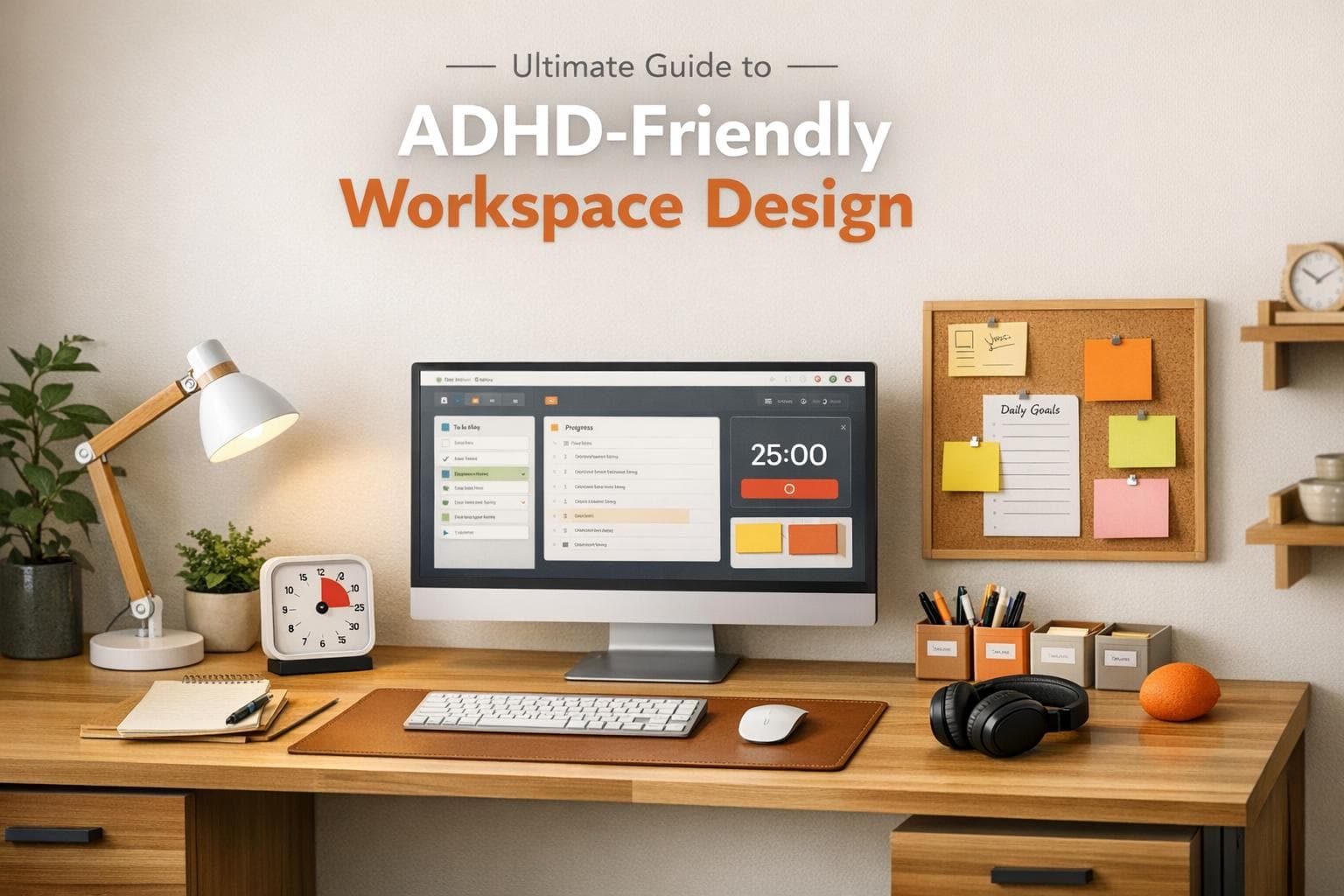
Ultimate Guide to ADHD-Friendly Workspace Design
Struggling to stay focused at work? Your workspace might be the problem. For the 15.5 million adults in the U.S. living with ADHD, typical office setups can feel overwhelming, with harsh lighting, constant noise, and clutter draining mental energy. But with a few adjustments, you can create a workspace that works with your brain instead of against it.
Here’s what you need to know:
- ADHD brains process every distraction - noise, clutter, lighting - making focus harder.
- Organization is key: Clear, labeled storage and visual reminders can reduce overwhelm.
- Design matters: Use ergonomic furniture, warm lighting, and defined zones for tasks.
- Digital tools help: Apps like Focusmo can manage time blindness and distractions.
Small changes like noise-canceling headphones, a clutter-free desk, or a visual timer can make a big difference. The goal? A workspace that reduces distractions, supports your focus, and helps you get things done.
12 SIMPLE Hacks To Make Your Home Office ADHD Friendly
How ADHD Affects Your Workspace Experience
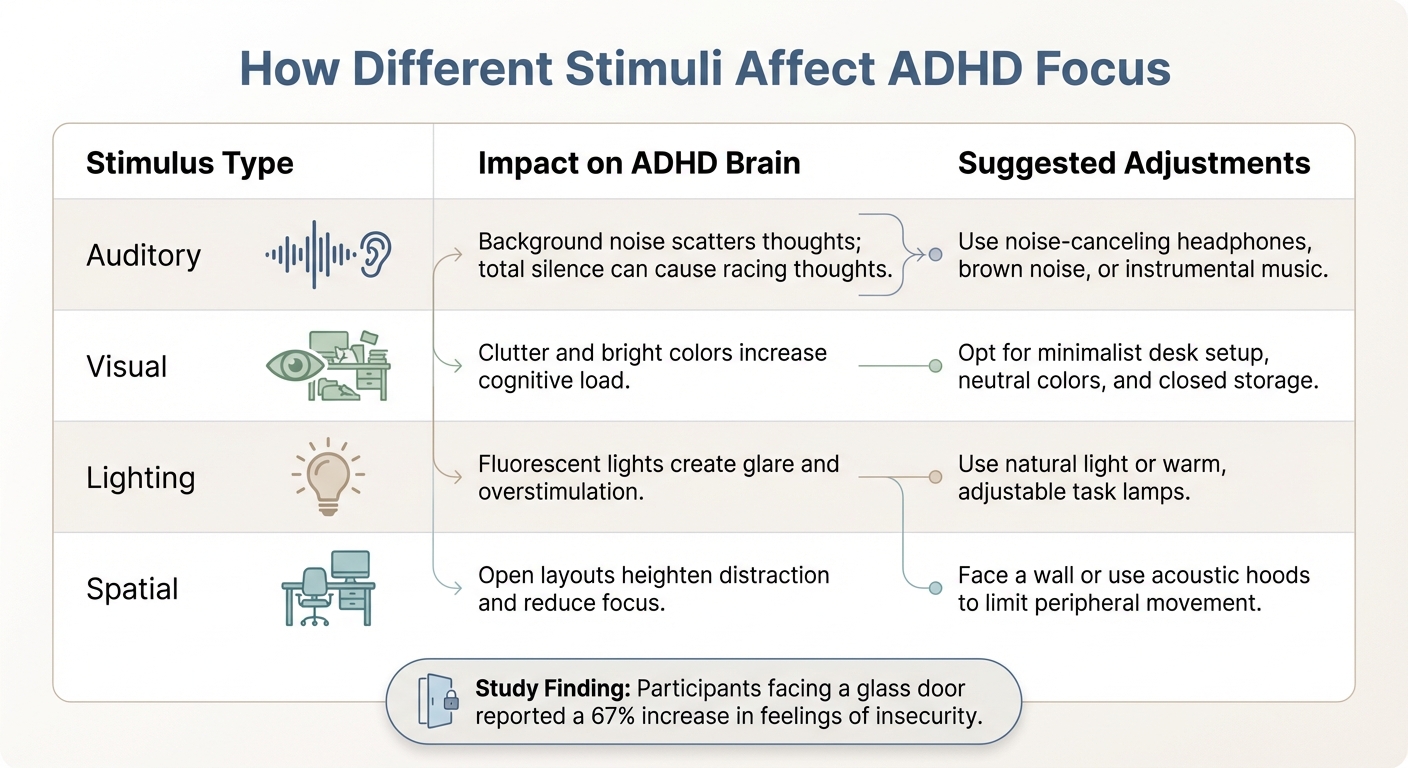
How Different Stimuli Affect ADHD Focus and Workspace Adjustments
Your workspace isn't just a backdrop for your work - it plays a direct role in shaping your ability to focus. For those with ADHD, the brain processes stimuli like noise, light, temperature, and clutter differently from the way neurotypical brains do. While others may filter out these environmental factors automatically, ADHD brains actively engage with each stimulus. This isn't about being "easily distracted" - it's a fundamental difference in how the brain processes information. That’s why creating an environment that reduces sensory overload and promotes structure is so important.
When your workspace floods you with competing stimuli, your brain doesn’t just notice - it processes every single one. Holly Oberacker from Navigating ADHD Inc. explains:
ADHD brains are extra sensitive to what's around us - noise, light, temperature, clutter. When your environment is overwhelming, your brain ends up on high alert, which makes it harder to focus, plan, and follow through.
This constant state of alertness drains the mental energy needed for tasks like organizing your thoughts, starting projects, and staying on track.
The effects are measurable. Research from the Princeton University Neuroscience Institute shows that cluttered environments force the brain to expend extra energy filtering out distractions. This reduces productivity and heightens stress. For ADHD brains, which already work overtime to regulate attention, this added strain can quickly lead to burnout. What might seem like a simple messy desk to someone else becomes a battlefield, with every visible item vying for attention.
How Sensory Overload Disrupts Concentration
Sensory overload forces your brain to juggle multiple stimuli at once. Background chatter, flickering fluorescent lights, the hum of an air conditioner, and scattered papers - all of these act like open browser tabs, eating up mental bandwidth. While neurotypical brains filter out these distractions as background noise, ADHD brains process them actively, leading to rapid cognitive fatigue.
This sensory bombardment comes from all directions. For instance, harsh fluorescent lighting can cause glare and overstimulation, resulting in headaches and making it nearly impossible to focus for long stretches. Temperature fluctuations add another layer of distraction. Warwick Batts, Client Services Manager at Office Principles, highlights this challenge:
When the environment is too hot or too cold, it becomes another thing my brain needs to process, taking away focus from my actual work.
Visual clutter is another culprit. A messy desk isn’t just an eyesore - it signals to your brain that the space is chaotic and unsuitable for work, leading to procrastination or even task paralysis. This isn’t laziness; it’s a form of executive function overload. The more visual distractions in your line of sight, the harder it becomes to focus.
Here’s how different types of stimuli affect ADHD brains, along with potential adjustments:
| Stimulus Type | Impact on ADHD Brain | Suggested Adjustments |
|---|---|---|
| Auditory | Background noise scatters thoughts; total silence can cause racing thoughts. | Use noise-canceling headphones, brown noise, or instrumental music |
| Visual | Clutter and bright colors increase cognitive load. | Opt for a minimalist desk setup, neutral colors, and closed storage |
| Lighting | Fluorescent lights create glare and overstimulation. | Use natural light or warm, adjustable task lamps |
| Spatial | Open layouts heighten distraction and reduce focus. | Face a wall or use acoustic hoods to limit peripheral movement |
The impact of these environmental factors is real. For example, a study on office orientation found that participants facing a glass door reported a 67% increase in feelings of insecurity. ADHD brains are especially sensitive to these factors, making workspace design a critical part of managing focus and productivity.
Why Organization Matters for ADHD Productivity
On top of sensory challenges, disorganization can further disrupt productivity by overloading the brain’s executive functions. ADHD directly affects these functions, which are responsible for planning, organizing, and initiating tasks.
The "out of sight, out of mind" phenomenon creates a unique challenge. If a task or tool isn’t visible, it can easily slip from your ADHD brain’s awareness. But keeping everything in plain sight can lead to overwhelming visual clutter. This isn’t a personal flaw - it’s a direct result of how ADHD impacts working memory, the mental space where you hold and manipulate information.
Time blindness adds another layer of difficulty. ADHD makes it hard to track time, leading to missed deadlines and collapsing schedules. Without external aids like timers or organized task lists, hours can disappear while you remain stuck in decision paralysis.
Even minor organizational hurdles can feel insurmountable. Misplacing a pen, dealing with a messy drawer, or searching for a document can lead to frustration and task abandonment. This isn’t about being overly dramatic - it’s tied to dopamine deficiency, which makes mundane tasks like filing papers or tidying up feel unbearably dull. ADHD brains crave novelty and stimulation, and routine organization doesn’t provide that.
The key isn’t to force yourself into systems designed for neurotypical minds. Instead, redesign your workspace to align with how your brain works. Use visual systems that keep priorities visible without creating clutter, create distinct zones for different kinds of work, and rely on external cues to combat time blindness and memory challenges. The next sections will guide you on how to implement these strategies in both your physical and digital workspaces.
Setting Up Your Physical Workspace for Better Focus
Designing your workspace to suit your ADHD needs can make a world of difference. Your environment can either help your brain work with ease or create unnecessary obstacles. The aim here isn’t to create a picture-perfect setup - it’s about crafting a space that reduces distractions and makes focusing feel more natural.
Minimizing Distractions Through Smart Layout
How you arrange your workspace can greatly influence your ability to stay focused. Start by positioning your desk near a window to take advantage of natural light, but make sure your monitor is parallel to the window to avoid glare.
An L-shaped desk tucked into a corner is a great option. It not only maximizes your work area but also naturally limits your peripheral vision, cutting down on distractions. Interestingly, a study conducted by Corgan's Research and Innovation team in November 2025 revealed that desks facing glass doors or open spaces behind them increased feelings of insecurity by 67%.
Storage placement matters, too. Keep shelves, bins, and filing cabinets out of your direct line of sight to minimize visual clutter. Stick to the "One-Task Visual" rule - only keep items for your current task on your desk, and store everything else away. For items you need to remember but don’t require immediately, clear, labeled bins placed just outside your main workspace can help.
You can also create distinct zones for different activities like deep work, brainstorming, or even movement. Use small cues like specific lighting or playlists to define each area.
Lastly, choose furniture that supports both movement and stability to meet your ADHD needs.
Selecting Furniture That Supports ADHD Needs
The right furniture can make a big difference in how well you can focus. Adjustable sit-stand desks are a fantastic choice. In fact, the same 2025 study by Corgan's Research and Innovation team found that alternating between sitting and standing reduces cognitive strain and improves mood. This flexibility can help with restlessness and those "jittery" feelings that often disrupt focus.
Don’t overlook your chair. Ergonomic chairs with adjustable height, lumbar support, and breathable fabric can help prevent discomfort - a common source of distraction. Chairs with caster wheels that allow small movements can also help regulate restlessness.
However, not all movement-friendly seating is helpful. The study found that using yoga balls as chairs actually reduced both comfort and attention. If you want a movement option, try under-desk pedals, a balance board, or a wobble stool. These options allow you to release excess energy without sacrificing the stability you need to stay focused.
Barnaby Lashbrooke, Founder and CEO of Time etc, sums it up well:
The ADHD brain thrives on variety. It's wired to seek novelty and fresh stimulation, so sitting in the same chair... can quickly feel more like a cage.
Instead of constantly rearranging your workspace, invest in furniture with built-in flexibility, like adjustable desks and movable components. For storage, use clear bins or rolling carts for frequently accessed items, and closed cabinets for less-used ones to keep clutter out of sight.
With your layout and furniture set, you can fine-tune sensory elements to complete your focus-friendly environment.
Optimizing Lighting and Sensory Conditions
Lighting plays a huge role in your ability to concentrate. Many people with ADHD are sensitive to harsh, bright lighting, which can lead to overstimulation or headaches. Replace overhead fluorescents with warm-toned LED lamps that have dimmers. Use natural light when possible, but balance it with softer lighting to avoid sensory overload. Cooler daylight tones can help with alertness but should be used sparingly.
Place desk lamps on the side opposite your writing hand to avoid shadows, and keep lights out of your direct line of sight to reduce eye strain. For noise management, noise-canceling headphones or white noise machines can be incredibly helpful. You can also use sound-absorbing curtains or acoustic panels to cut down on background noise in your home office.
Color choices matter, too. Muted blues, greens, and neutrals help create a calming atmosphere, while bold, bright colors can feel overstimulating. Occupational therapists Krysta Longridge and Katie Eichar describe the ideal workspace as:
Low stimulation environments are quiet, have soothing scents, make it easy to avoid interruptions (like a private office space), and are clutter-free, with a more neutral approach to decorating.
Don’t forget about smaller sensory details. Indoor plants, for example, can improve well-being and boost focus. Low-maintenance options like succulents, snake plants, or pothos can add a touch of nature without requiring much effort. An essential oil diffuser with scents like lavender or citrus can calm the nervous system, while keeping a cozy sweater or blanket nearby ensures physical comfort. Simple tactile tools, like stress balls or fidget toys, can also help manage sensory input without adding visual clutter.
The trick is finding the right balance - enough sensory input to keep your brain engaged, but not so much that it becomes overwhelming.
sbb-itb-8245ce4
Customizing Your Workspace for Your ADHD
Once you've optimized your physical workspace, the next step is tailoring it to meet your specific ADHD needs. ADHD impacts everyone differently, so creating a workspace that works with your brain can make all the difference. Think of it as an external support system for things like organization, task initiation, and follow-through. It can also help manage sensory inputs that might otherwise lead to overstimulation or burnout. Even small distractions can throw off your momentum, so setting up cues and shortcuts in your environment can help you stay on track.
By building on your layout and sensory adjustments, you can create a workspace that truly supports your unique needs. ADHD Specialist Holly Oberacker sums it up perfectly:
Working with ADHD isn't just about staying focused – it's about working with your brain, not against it.
Customizing your space also addresses the need for novelty, something many people with ADHD crave due to lower dopamine levels that can affect engagement. This doesn’t mean constantly rearranging everything - it’s more about incorporating flexibility to match your shifting energy and focus.
Setting Up Different Zones for Different Work
Breaking your workspace into zones can help your brain transition between tasks more smoothly. Instead of trying to do everything at one desk, create distinct areas tailored to the type of work you're doing and your energy level.
- Command Center: A focused area with an ergonomic chair and a large screen for deep, concentration-heavy tasks.
- Creative Corner: A cozy spot, like a chair by a window or a side table, for brainstorming, reading, or light calls.
- Active Zone: A standing desk or high counter where you can channel restless energy during lighter tasks or beat the post-lunch slump.
- Break Zone: A calming corner with a cushion or beanbag where you can take sensory breaks when things feel overwhelming.
Each zone can have its own unique cues. For example, use a specific desk lamp for your Command Center or play a lo-fi playlist in your Creative Corner to signal to your brain which "mode" you're in. To keep things tidy and functional, organize essential tools in a Supplies Zone - a basket, tray, or drawer - so your main workspace stays clear and ready for action.
Visual aids can also enhance these zones, helping you externalize your workflow for better focus.
Using Visual Tools to Stay Organized
Visual tools can be game-changers for managing ADHD challenges like time blindness and task sequencing. They work hand-in-hand with your zones to create a setup that supports your brain. As Hayley Honeyman from Stimara explains:
Out of sight is truly out of mind for many people with ADHD. If you can't see something, your brain may forget it exists.
Keeping tasks and supplies visible - but organized - can help you stay on track. Transparent storage options like clear acrylic organizers or mesh bins make it easy to locate items quickly. Adding labels - whether words or pictures - reduces the mental effort of remembering where things go.
A Kanban board is another excellent visual tool for task management. Use a whiteboard with columns like "To Do", "Doing", and "Done", and move sticky notes between them as you work. Moving a task to "Done" can even give you a little dopamine boost, reinforcing your progress.
To combat time blindness, try placing a visual timer - like a Time Timer or cube timer - in your line of sight. This makes the passage of time more tangible. You can also set up a Brain Dump station, such as a notebook or small whiteboard, to jot down distracting thoughts as they come up. This clears your mind so you can refocus on your current task. Vertical file holders can also keep active documents visible and easy to grab.
Using Digital Tools to Boost ADHD Productivity
Pairing an ADHD-friendly workspace with the right digital tools can make a huge difference in managing focus and reducing overwhelm. While your minimalist desk setup and sensory-friendly lighting help control physical distractions, digital tools tackle the chaos of notifications, tabs, and mental overload. They provide the external support that many ADHD brains need to manage attention effectively.
Think of these tools as an extension of your physical workspace, designed to help your brain transition smoothly between tasks. As Jeffrey James, CNP and Behavioral Health Provider, points out:
When we talk about ADHD, it's not necessarily a deficit in attention, but a deficit in regulating that attention.
By automating boundaries and reducing the reliance on sheer willpower, these tools help cut down on decision fatigue and add structure where it’s most needed. With around 15.5 million adults in the U.S. living with ADHD, digital solutions are becoming essential for turning a well-organized workspace into a truly productive environment.
Let’s dive into how tools like Focusmo can fit seamlessly into your workflow.
How Focusmo Helps People with ADHD Stay Focused
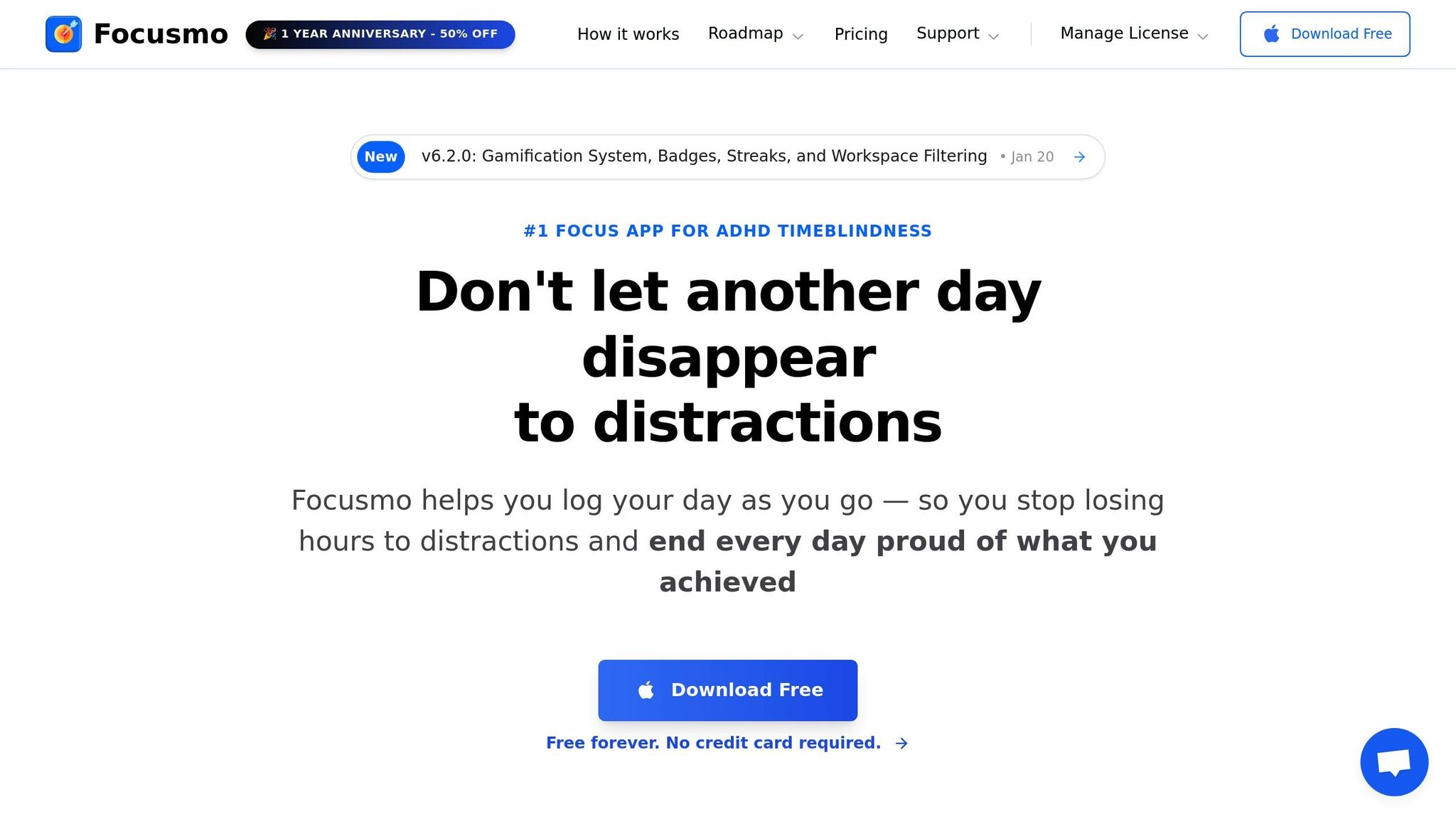
Focusmo is designed with ADHD challenges in mind, offering features like hourly check-ins to combat time blindness and floating task visibility to keep your priorities front and center. Instead of falling into distractions, these regular reminders help keep you grounded and on track.
Even when you're absorbed in a browser tab or document, Focusmo’s tools ensure your priorities stay visible. Its distraction-blocking feature limits access to time-wasting websites, while automatic time tracking provides insights into how your time is spent. The built-in Pomodoro timer uses visual cues to balance work and break intervals, helping maintain focus without burnout.
For those with ADHD, lower dopamine levels can make routine tasks feel almost impossible. Focusmo counters this by offering progress tracking and task completion notifications, which provide the motivation and immediate feedback that ADHD brains often crave.
But Focusmo is just one piece of the puzzle. Other productivity apps can fine-tune your daily routine even further.
Adding Productivity Apps to Your Daily Routine
Using digital tools effectively starts with identifying your biggest challenges. For instance, if digital clutter is a problem, browser extensions can help simplify your online environment. If background noise disrupts your concentration, try pairing noise-canceling headphones with focus-friendly sounds like brown noise or binaural beats. Research even suggests that a 15 Hz beta beat can improve study performance for students with ADHD.
Set up digital boundaries during your peak focus times. Use site blockers to limit access to distracting websites and schedule automated reminders to take breaks - this can prevent hyperfocus from leading to skipped meals or physical discomfort. These boundaries are especially helpful if you’re working in an active zone or using a standing desk.
Adjust tools like Pomodoro timers to match your personal rhythm. For example, shorter intervals, like 10 minutes of work followed by a 2-minute break, might suit you better than the traditional 25-minute sessions. You can also link digital tools with physical triggers - like starting a focus playlist when you sit at your desk or enabling distraction blockers when you switch to a standing workspace.
The goal isn’t to complicate your routine but to create an external system that supports the executive functions often disrupted by ADHD. As Jeffrey James reminds us:
ADHD very rarely presents the same way in every person... The goal is to identify realistic and effective tools that help you get and stay focused.
Your digital toolkit should feel like a trusted co-pilot, enhancing your ability to focus without adding extra stress. Together, these tools can help create a balanced, ADHD-friendly workspace that works with your brain instead of against it.
Conclusion
Designing a workspace that aligns with ADHD needs isn’t about striving for perfection - it’s about creating an environment that complements the way your brain works. Simple adjustments, like keeping your desk layout uncluttered, using adjustable lighting, or investing in ergonomic furniture, can help minimize sensory overload. Pairing these changes with digital tools, such as Focusmo, can further address both external distractions and internal challenges with focus and organization.
Your workspace is more than just a place to work - it’s an ecosystem where every detail plays a role. Noise-canceling headphones and clear storage options tackle physical clutter, while tools like distraction blockers and scheduled check-ins help manage digital chaos. Together, these elements create what researchers refer to as a "thrive space" - a setup designed to support how ADHD brains handle attention and energy. This approach transforms a basic workspace into a dynamic system that helps you stay on track.
Reducing mental strain is a priority. As Barnaby Lashbrooke, CEO of Time etc, explains:
The right setup clears the noise, reduces friction, and lets you bring out the creativity and drive that led you to start your business in the first place.
When your workspace takes care of the essentials - keeping tasks visible, minimizing distractions, and managing sensory input - it frees up your mental energy for the work that matters most.
Start with small, manageable changes. For example, reposition your monitor to avoid glare or try a website blocker during your most productive hours. Experiment to find what suits your brain best, and tweak as needed. Remember, it’s okay to need a workspace tailored to your unique needs.
Your workspace should grow with you, offering support on both good and challenging days. By blending thoughtful physical adjustments with smart digital tools, you create an environment that not only helps you stay focused but also allows you to thrive.
FAQs
How can I create a workspace that minimizes sensory overload with ADHD?
To make your workspace less overwhelming, start by simplifying your surroundings to minimize distractions. For those with ADHD, the brain is often more sensitive to things like bright lights, loud sounds, and clutter. A calm, organized environment can make it easier to stay focused and feel less stressed.
Here are some ideas to get started:
- Declutter your space: Keep your desk tidy by storing away items you don’t need. A clean workspace helps reduce visual distractions.
- Adjust your lighting: Opt for soft lighting, like a warm-white desk lamp (around 2,700 K), and steer clear of harsh overhead lights.
- Cut down on noise: Noise-canceling headphones or white noise machines can help block out disruptive sounds.
- Use calming colors: Soft blues or greens, along with other neutral tones, can make your space feel more relaxing.
- Plan structured breaks: Tools like Pomodoro timers can help you work in focused bursts while reminding you to take regular breaks to recharge.
For added help, consider using tools like the Focusmo app for macOS. It offers features like time tracking, distraction blocking, and break reminders to keep you on task. By combining these strategies, you can create a workspace that supports focus and keeps sensory overload in check.
What are the best digital tools to help manage ADHD in the workplace?
Digital tools can be a game-changer for improving focus and creating structure, especially for individuals with ADHD navigating the workplace. Take Focusmo, for example - a productivity app tailored to help users stay on track. It offers handy features like hourly check-ins, automatic time tracking, distraction-blocking capabilities, and Pomodoro timers. These tools are designed to make managing time less stressful and keep distractions at bay.
Beyond apps like Focusmo, other digital solutions can also make a difference. Task management platforms with visual boards and built-in reminders help break down projects into manageable steps. Digital whiteboards are perfect for brainstorming and organizing ideas, while browser extensions that block distracting websites ensure your attention stays where it needs to be. Combine these tools with a tidy, well-organized physical workspace, and you’ve got a recipe for better focus, higher productivity, and improved performance at work.
How can I set up a workspace that helps with focus and productivity if I have ADHD?
Creating an ADHD-friendly workspace begins with reducing distractions. Start by keeping your desk as clear as possible - stick to the essentials like your laptop, a notebook, and a pen. Store other supplies in labeled drawers or on shelves to keep them out of sight but easy to find. Opt for a neutral or single-color backdrop to cut down on visual clutter. A clean, simple setup helps create a calming environment, making it easier to concentrate.
Comfort and practicality are just as important. Invest in an ergonomic chair and, if possible, an adjustable standing desk to allow for movement throughout the day. Noise-canceling headphones can help block out distracting sounds, while soft, natural lighting or a daylight-style lamp can ease eye strain. Keep a small whiteboard or a few sticky notes within arm’s reach for jotting down quick ideas without adding mess to your desk.
Incorporating digital tools and routines can also boost focus. Simplify your computer's screen layout by organizing folders or using virtual desktops for different projects. A focus timer, like the Pomodoro technique, can help you manage time effectively. Apps such as Focusmo for macOS offer features like distraction blocking, time tracking, and regular check-ins, making it easier to stay on task. By combining a clutter-free physical space, ergonomic tools, and structured digital habits, you can build a workspace that encourages productivity and minimizes overwhelm.