Daily Productivity Checklist for Busy Professionals
Daily Productivity Checklist for Busy Professionals
Ever feel like your workday ends without any real progress? You’re not alone - 68% of workers feel overwhelmed by their workload. A daily productivity checklist can help you regain control. Writing down your tasks boosts your chances of completing them by 42%, and planning for just a minute can save 40 minutes of work.
Here’s how to structure your day for maximum productivity:
- Morning Priorities: Start by identifying your top 3 tasks (MITs) and break them into smaller steps if needed. Use tools like Focusmo to track tasks and block distractions.
- Peak Work Hours: Dedicate your most focused hours (e.g., 9–11 AM) to deep work using Pomodoro timers. Take quick breaks to recharge.
- Midday Reset: Step away for lunch, rehydrate, and handle lighter tasks like emails. Group similar tasks together to stay efficient.
- Afternoon Focus: Adjust for the energy dip by using longer work sessions (52 minutes) and proper breaks to maintain momentum.
- Evening Wrap-Up: Review your day, set tomorrow’s priorities, and create a clear transition to end your workday.
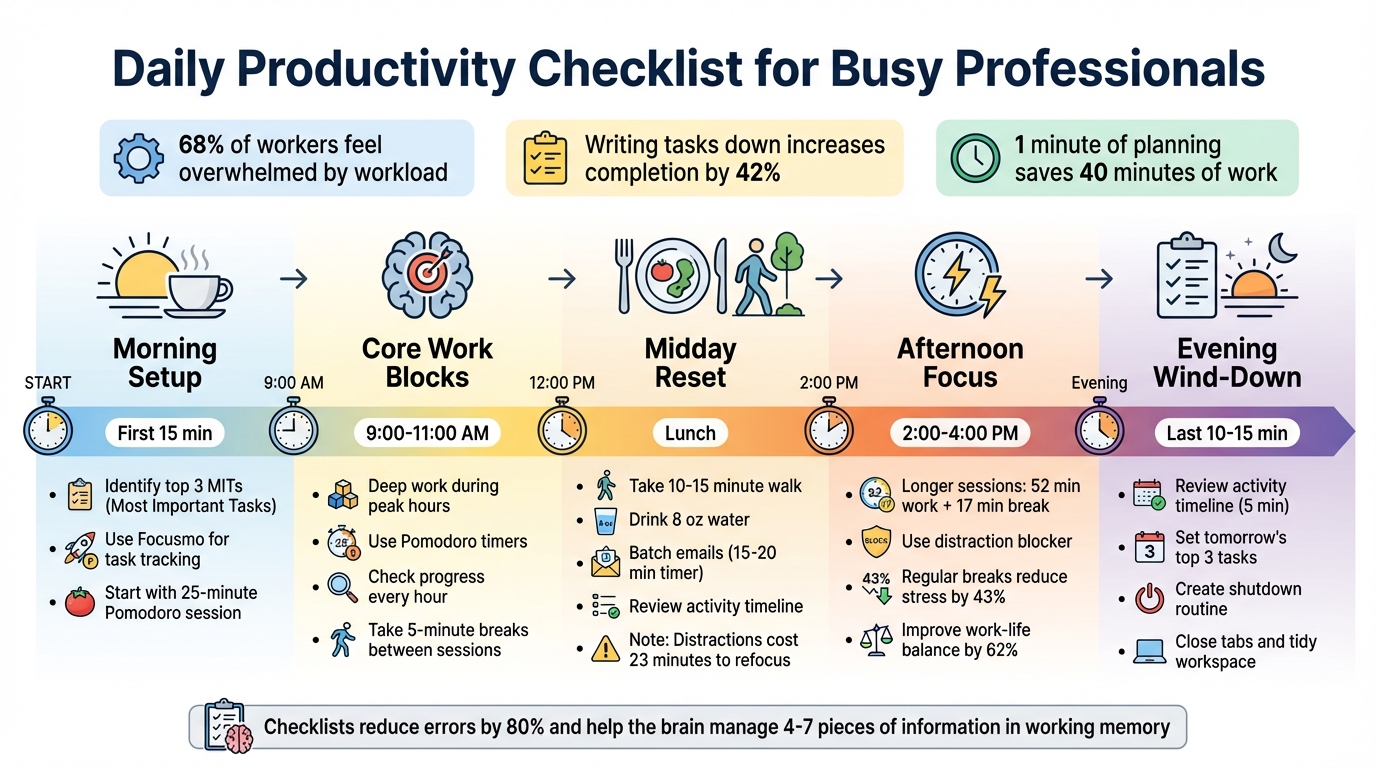
Daily Productivity Checklist: 5-Phase Schedule for Busy Professionals
The Checklist Hack Productivity Gurus Don’t Tell You About #adhdorganization #checklists
Morning Setup: Start Your Day with Clear Priorities
The first 15 minutes of your workday can shape everything that follows. Before diving into emails or Slack messages, take a moment to review your calendar and task list. Identify the 2–3 Most Important Tasks (MITs) that will define your day. This simple habit helps you avoid decision fatigue and ensures you're focused on your goals instead of reacting to others. Here's how to set the stage for a productive day.
Identify Your Top 3 Tasks for the Day
Ask yourself: Which tasks, if completed today, will make the biggest difference? Write down your top three and estimate how many 25-minute blocks each will take. If a task seems overwhelming and requires more than two hours (roughly four Pomodoro sessions), break it into smaller, manageable steps. For quick tasks that take less than 25 minutes, group them together into one focused work session.
"A well-designed checklist anchors your day with clarity. You begin with your MITs (most important tasks), carve out intentional breaks, and balance personal and professional priorities." - Francesco, Akiflow
Use Focusmo for Task Tracking and Distraction Management
Once you've chosen your MITs, input your top task into Focusmo's floating island feature to keep it front and center. Activate automatic tracking so the app logs your activities in the background, eliminating the need for manual entries. To make the most of your peak focus hours, enable distraction blocking and minimize interruptions.
Kick Off with a 25-Minute Pomodoro Session
Tackle your #1 MIT with a 25-minute Pomodoro session to build momentum right away. This strategy helps you overcome procrastination. Once the timer is running, commit fully - no checking emails, team chats, or sneaking a peek at social media. If unrelated thoughts pop into your mind, jot them down in your Later Box and get back on track.
"Concentration and consciousness lead to speed, one Pomodoro at a time." - Francesco Cirillo, Inventor of the Pomodoro Technique
Completing that first focused session gives you a boost of confidence, setting a positive tone for the rest of your day.
Core Work Blocks: Stay Focused During Peak Hours
Your brain naturally follows ultradian rhythms - cycles of peak mental performance that last about 90 to 120 minutes. These often align with the 9:00–11:00 AM window, making it an ideal time to tackle your most demanding tasks. By syncing your work with these focus cycles, you can significantly improve your productivity.
Deep Work Sessions from 9:00–11:00 AM
After setting up your morning routine, commit this two-hour block to deep, uninterrupted work. Focus on your most important task during this time. Use a Pomodoro timer with distraction-blocking features to stay on track. For particularly challenging tasks, consider longer intervals, like 50-minute sessions.
When distractions pop into your mind, jot them down on a "distraction sheet" to handle later . If a meeting or call interrupts your session, restart the timer to maintain the flow . While this approach might feel strict at first, it helps train your brain to prioritize focus time.
"Much of the stress that people feel doesn't come from having too much to do. It comes from not finishing what they've started." - David Allen, Productivity Expert
During the 5-minute breaks between sessions, step away from your desk. Stretch, grab some water, or take a short walk - these quick resets recharge your brain far more effectively than scrolling through your phone . If you finish a task before the timer ends, use the extra time for overlearning - explore related topics or polish your work - rather than jumping to the next task.
Once your deep work is done, keep the momentum going with regular progress check-ins.
Check In Every Hour to Track Progress
To stay on track, take 1–2 minutes at the start of each hour to review your progress. Mark completed tasks, update your to-do list, and note any urgent priorities using tools like Focusmo. Check your activity timeline to see how your actual progress aligns with your initial plan .
If you notice you're behind schedule, resist the urge to skip breaks or rush into the next task. Instead, rely on pre-scheduled overflow blocks later in the day to catch up without throwing off your rhythm. For smaller tasks like quick emails or calls, batch them into a single focus session rather than scattering them throughout your morning . After each check-in, apply the "DWYDN" method - "Do What You're Doing Now" - to refocus and avoid distractions.
Midday Reset: Take a Break and Handle Routine Tasks
After a productive morning, it’s time to pause and recalibrate. Around lunchtime, your body's natural rhythm tends to dip, often leaving you feeling sluggish or less focused. Instead of forcing yourself to power through, take this opportunity to recharge and tackle lighter, administrative tasks.
Step Away for a Real Lunch Break
When it’s time to eat, make a point to leave your desk behind. Eating while working or scrolling through emails doesn’t allow your mind the reset it needs. Use this break to truly disconnect and refresh your energy levels.
A quick 10–15 minute walk outdoors can work wonders for your energy and focus. Pair it with proper hydration - about 8 ounces of water - and some light stretching to loosen up. Feeling particularly drained? A short 15- to 20-minute nap can do the trick without messing up your nighttime sleep.
"Our body's natural circadian rhythm... sends signals to the brain during the day to keep us alert, awake and sharp. Around lunchtime, there's a dip in these signals that can make us feel sleepy." - Anthony Reffi, Ph.D., Behavioral Sleep Specialist, Henry Ford Health
Once you’ve recharged, it’s time to shift gears and focus on simpler, routine tasks to keep the momentum going.
Batch Emails and Administrative Work
With your energy restored, dedicate a single block of time to routine tasks like answering emails, scheduling meetings, or responding to messages. Grouping these tasks together helps minimize distractions and protects your focus for deeper work later. Remember, distractions can cost you an average of 23 minutes to fully regain focus.
Set a timer for 15–20 minutes to keep this session efficient. Use the two-minute rule: if a task takes less than two minutes, handle it immediately; if it’ll take longer, schedule it for later. Tools like Focusmo’s workspace features can help you track and organize these smaller tasks effectively.
Check for Distractions in Your Activity Timeline
Before diving into your afternoon, spend a minute or two reviewing Focusmo’s activity timeline from your morning session. Look for patterns - did you stick to your planned tasks, or did distractions like emails or social media derail you? About 50% of workday distractions are self-inflicted, so spotting these trends can make a big difference.
If external interruptions like phone calls or coworker questions keep cropping up, try the inform-negotiate-schedule method: politely let them know you’re busy, suggest a later time to talk, and schedule the callback during a designated break. Use these insights to adjust your schedule, reschedule unfinished tasks, or create overflow blocks for unexpected items.
sbb-itb-8245ce4
Afternoon Focus: Keep Working Through the Energy Dip
As the afternoon rolls in, it's normal to feel your energy wane, especially between 2:00 PM and 4:00 PM. This is when your body's natural rhythms slow down, making tasks seem harder than they did earlier in the day. Instead of relying solely on willpower, tweak your work strategy to align with this slower pace. By adjusting how you work during this time, you can stay productive without burning out.
Longer Pomodoro Sessions from 2-4 PM
To tackle the afternoon slump, try extending your focus sessions to 52 minutes of work followed by a 17-minute break. This approach helps maintain momentum during this energy dip.
Leverage tools like Focusmo's distraction blocker to keep your session uninterrupted. If an interruption does happen, restart the session rather than trying to power through. For those pesky distracting thoughts, keep a notepad handy to jot them down quickly and return to your task.
Feeling stuck? Use the "5-minute trick": commit to working on a task for just five minutes. Often, this small step is all you need to get into the flow of work.
While these longer sessions can help you stay on track, don’t underestimate the importance of taking proper breaks to recharge.
Take a 5-Minute Mental Break
After each extended session, step away from your desk for a real mental reset. Skip checking your phone or email during this time - your brain needs a true break. Research shows that regaining full focus after a distraction can take over 20 minutes, so it’s better to avoid interruptions altogether.
Use Focusmo’s reminders to schedule your breaks. During these short pauses, try simple activities like taking three deep breaths, stretching, or walking near a window. Even a brief walk or stretch improves blood flow and can shake off that sluggish feeling. Staying hydrated is another easy way to keep your energy up - keep a water bottle within reach.
Set a timer for your break to avoid accidentally slipping into procrastination. Interestingly, workers who take regular breaks report 43% less stress and a 62% better work-life balance compared to those who don’t. These small resets are key to staying productive and focused as you wrap up your workday.
Evening Wind-Down: Review Your Day and Plan Tomorrow
Wrap up your day by taking a few minutes to reflect on what you’ve achieved and set yourself up for success tomorrow. Spending just 10–15 minutes on this can help you clear your head and avoid obsessing over unfinished tasks.
Check Your Activity Timeline to Review the Day
Take 5 minutes to scan Focusmo's activity timeline and see how your day really unfolded. This tool gives you a clear picture of how you spent your time and highlights your productivity patterns.
"Our brains lie. You think you spent 2 hours being productive, but really, you wasted 45 minutes scrolling Instagram. Writing it down gives you the cold, hard truth - and the power to fix it." - Justin Belmont, CEO
Set Tomorrow's Top 3 Tasks
Decide on three key tasks for tomorrow - your "Most Important Tasks" (MITs). Use Focusmo's task reset feature to clear out today’s completed list and input your new priorities. Research shows that writing down goals makes you 42% more likely to achieve them.
Focus on tasks that will create the most impact. If you didn’t finish something today, decide whether to reschedule it, break it into smaller steps, or let it go entirely. This strategy helps you avoid the Zeigarnik effect, where your mind keeps circling back to incomplete tasks.
Create a Shutdown Routine
End your workday intentionally. Close out tabs, log off, and tidy up your workspace. Cal Newport, author of Deep Work, advises ensuring “that every incomplete task, goal or project has been reviewed and that for each you have confirmed that either 1) you have a plan you trust for its completion, or 2) it's captured in a place where it will be revisited at the right time”.
Mark the end of your workday with a clear transition, like updating your planner or changing into more casual clothes. If you’re working from home, consider a 10-minute walk to mimic a commute and signal to your brain that it’s time to wind down. You can also schedule a specific post-work activity, like exercising or having dinner, to reinforce the boundary between work and personal time.
Conclusion: Make This Checklist a Daily Habit
Incorporating this checklist into your daily routine can help create a smoother, more efficient workflow. By sticking to it, you can reduce decision fatigue by offloading tasks to a clear system, and even cut down on errors by as much as 80%.
For professionals juggling a hectic schedule - especially those managing ADHD - Focusmo offers tools that work like an external brain to tackle challenges like time blindness and working memory issues. Features like the blue waves banner, floating task display, and hourly check-ins make time more tangible and keep priorities front and center. As Aiden Thompson, a Software Engineer, shared:
"The blue waves in banner really helps me visualize time especially when I am time blind, really helps the ADHD brain".
Start your day with clear, actionable steps. Choose three key tasks, set your timer, and dive into a 25-minute Pomodoro session. Tie this checklist to an existing habit - like reviewing tasks right after your morning coffee - to make it easier to stick with. Plus, the small dopamine boost from checking off tasks adds a rewarding layer to your productivity.
Remember, the average adult brain can only hold four to seven pieces of information in working memory at a time. That’s why tools like visual timers, external schedules, and consistent routines are game-changers. They lighten the mental load and make decision-making more straightforward.
Feel free to tweak the checklist as needed to keep it aligned with your goals. When applied consistently, this approach can drive noticeable improvements in focus and productivity.
FAQs
What’s the best way to prioritize tasks using a daily productivity checklist?
Begin by pinpointing your Most Important Tasks (MITs) - those top 3-5 tasks that will move you closer to your goals. These should take center stage on your checklist, ensuring they get your attention first. To organize the rest of your tasks, try a straightforward system like the Eisenhower Matrix. Label each task as one of the following:
- Urgent & Important: Tasks that demand immediate action and have significant consequences.
- Important but Not Urgent: Tasks that contribute to long-term goals and require planning.
- Urgent but Not Important: Tasks that need quick action but don’t have a major impact.
- Neither: Tasks that are low-priority or distractions.
Tackle Urgent & Important tasks early in the day when your focus is sharpest. Save Important but Not Urgent tasks for dedicated deep-work sessions later.
To maintain momentum, try the Pomodoro Technique. Work in 25-minute focused intervals, followed by 5-minute breaks. This approach helps you stay energized and prevents burnout, especially if you struggle with staying on task for extended periods.
At the end of your day, review your checklist. Mark off completed tasks and re-prioritize any unfinished ones for the next day. With this method, you can transform an overwhelming to-do list into a clear, actionable plan.
How can I stay focused during the afternoon energy slump?
To combat that post-lunch energy slump, try breaking your afternoon into manageable, focused work sessions with short, restorative breaks. One popular method is the Pomodoro technique: work for 25 minutes, then take a 5-minute break. This rhythm helps refresh your focus and fend off fatigue. Use those breaks wisely - stand up, stretch, or take a quick walk to get your blood flowing and energy levels up. Pair this with a protein-packed snack, like a handful of nuts with an apple or some Greek yogurt topped with berries, to keep your energy steady and avoid sugar crashes. And don’t forget to stay hydrated - regular sips of water can make a big difference.
Plan your day to match your natural energy patterns. Save demanding tasks for the morning when your focus is sharper, and leave the afternoon for lighter activities like responding to emails or updating reports. If drowsiness creeps in, try a quick breathing exercise - inhale for 4 seconds, hold for 7, and exhale for 8 - or take a 10-minute power nap to recharge. Keeping your workspace tidy and turning off unnecessary notifications can also help you stay on track and make the most of your afternoon.
How can Focusmo help me stay productive throughout the day?
Focusmo helps boost your daily productivity by offering a structured way to manage your tasks and time. One standout feature is its built-in Pomodoro timer, which divides your work into 25-minute focus intervals with short breaks in between. This approach keeps your energy levels up and helps ward off mental fatigue. Plus, every session is automatically logged, giving you a clear record of your progress and achievements.
The app also allows you to focus on your most important tasks (MITs) by assigning them to specific time blocks. Its pre-designed workflow includes focused work sessions, wellness breaks, and an end-of-day review, making it easier to prioritize tasks, stay organized, and maintain momentum throughout the day.
What’s more, Focusmo works seamlessly with macOS tools like notifications and calendar syncing. This integration minimizes distractions and keeps you accountable. By combining planning, timing, and tracking all in one place, Focusmo simplifies your workflow and is especially helpful if you find it challenging to stay focused.