How Do Hourly Check-Ins Improve Productivity?
How Do Hourly Check-Ins Improve Productivity?
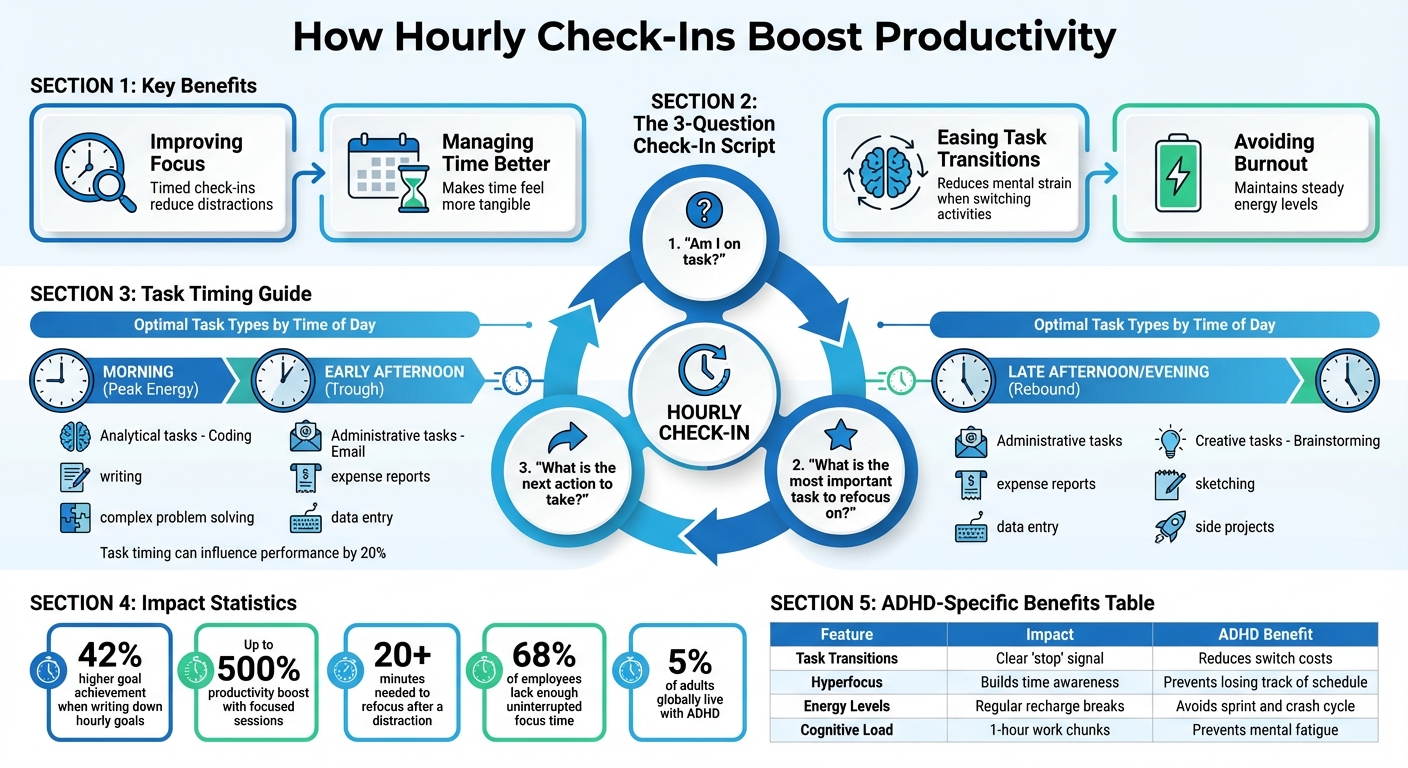
Hourly check-ins are a simple yet powerful way to improve focus and productivity. By setting reminders every hour, you can pause, evaluate your progress, and reset your intentions. This approach is especially helpful for individuals with ADHD, as it combats time blindness and provides structure to the day. Key benefits include:
- Improving focus: Timed check-ins help you stay on task and reduce distractions.
- Managing time better: They reveal how you're spending your day, making time feel more tangible.
- Easing task transitions: Regular pauses make it easier to switch between activities without mental strain.
- Avoiding burnout: Short breaks prevent exhaustion and help maintain steady energy levels.
Using tools like Focusmo can automate this process with reminders, task tracking, and distraction blocking, making it easier to stay organized. Whether you're managing ADHD or just looking to work more efficiently, hourly check-ins offer a straightforward way to stay productive.
How to Implement Hourly Check-Ins for Maximum Productivity
How Hourly Check-Ins Boost Productivity
Reducing Time Blindness
Ever feel like hours just vanish without a trace? That’s time blindness, where time becomes an abstract concept. Hourly check-ins bring time into focus, making it feel more concrete. When an alarm goes off every hour, it acts as a reality check, anchoring you to the present moment.
These check-ins also serve as a time audit, revealing how you’re truly spending the 1,440 minutes in your day. Over time, they help you develop a more accurate sense of how long tasks actually take, turning vague time estimates into actionable insights.
Maintaining Focus and Avoiding Distractions
Hourly prompts are like a tap on the shoulder, reminding you to check whether you’re still on task. When the timer rings, simply ask yourself, “Am I focused?” If not, it’s a chance to course-correct immediately. This kind of self-monitoring is especially helpful for those with ADHD, where attention can drift without warning.
These check-ins also take advantage of Parkinson’s Law, which states that work expands to fill the time available for its completion. By setting hourly limits, you create a sense of urgency that drives efficiency. Breaking tasks into one-hour chunks not only keeps you focused but also prevents your working memory from becoming overloaded. One individual even shared that using hourly alarms doubled their productivity within a week.
Additionally, these structured intervals make transitioning between tasks smoother, eliminating the mental friction that often comes with switching gears.
Supporting Task Transitions and Preventing Overfocus
For those with ADHD, transitioning between tasks can feel like climbing a mountain due to higher "switch costs" compared to neurotypical individuals. Hourly check-ins act as a built-in stop signal, easing the mental effort required to shift from one activity to another. These scheduled pauses give your brain the green light to move on, reducing the strain of transitions.
Regular breaks also combat the "sprint and crash" cycle, where it’s all-out effort followed by exhaustion. ADHD coach Liz Welshman describes it as being either “all go or all low”. Hourly alarms help balance energy levels, ensuring you don’t burn out after a single intense burst of work. These short pauses act as a reset button, keeping burnout at bay and productivity steady throughout the day.
| Feature | Impact of Hourly Check-Ins | Benefit for ADHD |
|---|---|---|
| Task Transitions | Provides a clear "stop" signal | Reduces switch costs and executive strain |
| Hyperfocus | Builds awareness of time passing | Prevents losing track of the day’s schedule |
| Energy Levels | Prompts regular recharge breaks | Avoids the sprint and crash cycle |
| Cognitive Load | Breaks work into 1-hour chunks | Prevents mental fatigue and overload |
Setting Up Hourly Check-Ins for ADHD Productivity
Choosing Check-In Intervals and Schedules
Starting with 60-minute intervals is a good baseline, but if your attention span tends to waver sooner, shorter intervals like 5, 10, or 15 minutes might work better. The key is to align the intervals with your natural focus capacity.
For a typical workday, set your first alarm an hour after you begin, and schedule the last one to coincide with the end of your shift. Plan to tackle your most demanding tasks, often referred to as "deep work", during high-energy periods in the morning. Use the check-ins to guard this time against distractions. Also, remember to include short buffer breaks between major work sessions to recharge.
This structured approach reduces the number of decisions you have to make about what to do next, which helps conserve mental energy. Studies show that around 5% of adults globally live with ADHD, and taking regular breaks during mentally taxing tasks can significantly boost performance and reduce fatigue.
With your schedule in place, the next step is to create a simple script for your hourly check-ins.
Creating a Simple Check-In Script
When your alarm goes off, use a quick three-question script to assess your progress. Start by asking yourself: "Am I on task?" Then, "What is the most important task to refocus on?" Finally, "What is the next action to take?". That last question is crucial - it gives you a clear starting point to combat task paralysis.
Keep a notepad nearby to jot down any distracting thoughts that pop up. You can review these during designated breaks. For tasks that take less than two minutes, handle them right away. Anything more time-consuming can be scheduled for later.
Once you've got a clear process for your check-ins, it's time to focus on breaking tasks into smaller, manageable pieces.
Breaking Down Tasks for Hourly Focus
Pairing your check-in routine with structured task management can make a big difference in staying productive. Large projects can feel intimidating, so break them into smaller chunks that take no more than 30 minutes to complete. If a task stretches beyond four check-in intervals, divide it further.
Match your tasks to your energy levels throughout the day. Use your peak hours in the morning for analytical work, such as coding or tackling detailed reports. Save the early afternoon, when energy tends to dip, for simpler administrative tasks like emails or data entry. Late afternoon or evening, when energy rebounds, can be a great time for creative work like brainstorming or side projects. Research shows that the timing of a task can influence performance by as much as 20%.
| Task Type | Best Timing | Example Activities |
|---|---|---|
| Analytical (Peak) | Morning | Coding, writing, complex problem solving |
| Administrative (Trough) | Early Afternoon | Email, expense reports, data entry |
| Insight/Creative (Rebound) | Late Afternoon/Evening | Brainstorming, sketching, side projects |
To avoid the mental fatigue of frequent task-switching, batch similar small tasks into a single hourly block. For instance, instead of checking emails throughout the day, dedicate one focused 60-minute session to tackle them all at once. Treat each hour as a "race against time" to complete a specific sub-task before the next alarm sounds - this gamified approach can create urgency and help maintain momentum. Plus, writing down your hourly goals can boost your chances of achieving them by 42%.
Using Focusmo to Automate Hourly Check-Ins on Mac
Setting Up Hourly Notifications
Focusmo takes the hassle out of hourly check-ins by automating the process with two simple prompts: "What are you doing?" and "What's next?" These quick questions help you stay on track and avoid losing precious time to distractions. Once prompted, you can log your current task, which then appears on the "Floating Island" at the top of your screen. This persistent visual reminder stays visible across your windows, keeping your objective front and center.
Getting started is easy - just download the app and enable hourly prompts. Many users, particularly those with ADHD, find the "blue waves" in the notification banner incredibly helpful for making time feel more tangible. Software engineer Aiden Thompson shared:
"The blue waves in banner really helps me visualize time especially when I am time blind... I have it always visible so I get reminded constantly of my current task."
Once you’ve set up your notifications, Focusmo also provides tools to review how well you’re spending your time.
Tracking Progress with Focusmo's Activity Insights
Beyond hourly reminders, Focusmo keeps a log of your daily activity. It automatically tracks the apps and websites you use, creating a detailed timeline of your day. At the end of your workday, you can review this timeline to identify patterns and pinpoint where your time tends to slip away. This can help you make adjustments to your schedule and stay more aligned with your goals.
The app’s visual dashboard also lets you compare your planned tasks to what you actually accomplished. This feature is especially valuable considering that 68% of employees report not having enough uninterrupted focus time.
Combining Check-Ins with Focusmo's Distraction Blocking
Focusmo doesn’t stop at tracking - it also helps you stay focused by blocking distractions during critical work sessions. When you start a high-priority task, you can initiate a focus session that combines hourly check-ins with distraction-blocking tools. This creates a productive environment where you can work uninterrupted, potentially boosting your efficiency by up to 500%. One user described the experience:
"Your task stays pinned at the top of your screen - like a tiny anchor for your brain. Start a session anytime if you want deeper focus or distraction blocking."
Faye Campbell from motionapp.com highlighted another benefit:
"It's just handy to have an accountability buddy to remind me: just do one thing, finish this one thing, do what you said you were going to do."
Given that it often takes 40 to 50 minutes to fully immerse yourself in complex tasks, protecting these focus blocks with tools like Focusmo can help you achieve the deep concentration needed for peak productivity.
sbb-itb-8245ce4
Tips for Sustaining an Hourly Check-In Routine
Adjusting Frequency to Avoid Alert Fatigue
Hourly check-ins are meant to keep you on track, but they shouldn't feel overwhelming. If constant alarms are wearing you out, try adjusting the intervals. For instance, you might extend them to every 2 or 3 hours, or shorten them if you find yourself losing focus earlier. Some people thrive with shorter intervals, like 10 or 15 minutes, while others need longer stretches to stay productive. If you notice your attention slipping around the 15-minute mark, consider setting check-ins for every 10 minutes instead.
Switching up your alarm tones can also make a big difference. Changing the notification sound every few weeks keeps the reminders fresh and prevents them from fading into the background.
Once you've fine-tuned the timing, take some time to review your performance data for even better results.
Using Reflection and Data to Improve Your Routine
At the end of each week, take a look at your Focusmo timeline to identify patterns. Are there recurring distractions? Are your time estimates matching up with how long tasks actually take? A simple way to track this is by marking each check-in as "Y" (on-task) or "N" (off-task). This can help highlight where you might be misjudging your time. Research shows that 31.35% of adults with ADHD struggle with estimating task durations accurately, so comparing your guesses against Focusmo's data can be eye-opening.
Use these insights to tweak both your check-in intervals and how you break down tasks. This kind of reflection helps you create a routine that better aligns with your energy and priorities.
Personalizing Check-Ins for Energy and Environment
Your energy levels and surroundings play a big role in how effective your check-ins are. Plan high-effort tasks during times when you're most alert, and save simpler tasks for when your energy dips. If you're in a shared space, consider using visual cues like Focusmo's Floating Island instead of audible alarms to avoid disturbing others.
For particularly demanding tasks, try working in 10- to 20-minute bursts, followed by a 5-minute break. Setting a pre-timer 5 minutes before your check-in can also help you transition smoothly between activities. Experiment with these strategies and adjust them to fit your unique work style and environment.
Calendar blocking fails for ADHD (here’s what to do instead!)
Conclusion
Hourly check-ins bring a sense of structure to your day, making time feel more manageable while helping to combat time blindness and maintain focus. By breaking your schedule into focused intervals, you can avoid feeling overwhelmed and keep your attention sharp. Studies reveal that it can take over 20 minutes to fully refocus after a distraction. Hourly check-ins are a simple way to protect that precious time.
With Focusmo, these check-ins are automated through tailored notifications, distraction-blocking tools, and detailed activity tracking. This takes the pressure off managing your routine, allowing you to concentrate on what really matters. It’s a straightforward way to reclaim lost time and improve your daily productivity.
For individuals with ADHD or anyone looking for a more structured approach to staying on task, hourly check-ins turn good intentions into actionable steps. The combination of regular reminders, actionable insights, and automated support creates a system where productivity feels achievable, not draining.
Want to see the difference for yourself? Try Focusmo’s 7-day free trial to uncover which tasks take longer than expected, identify distractions, and fine-tune your routine for better results.
FAQs
How do hourly check-ins help people with ADHD stay productive?
Hourly check-ins serve as a simple yet effective tool for individuals with ADHD to manage their time and stay focused. By taking a brief pause every hour, these check-ins introduce a steady rhythm to the day, making time feel more structured and easier to grasp. This can help address challenges like time blindness and reduce the chances of drifting off into unrelated tasks.
These regular pauses act as a mental reset, offering a moment to reflect on what you're doing, refocus your attention, or decide if it's time to switch gears or take a break. This practice encourages greater self-awareness, limits distractions, and keeps you aligned with your daily goals - an approach that can be particularly helpful for those navigating the unique challenges of ADHD.
How can I set up hourly check-ins to boost productivity?
Hourly check-ins can be a straightforward yet powerful way to boost focus and manage your time more effectively. Here's how you can make them work for you:
- Set up reminders: Use your phone, a clock, or a time management app to set hourly alerts. Pick a notification style - whether it's a sound or a visual cue - that fits your environment and preferences.
- Pause to reassess: When the reminder goes off, take a moment to reflect on what you've accomplished so far and decide what comes next. For instance, you might think, "I just wrapped up drafting the introduction; now I'll move on to outlining the next section."
- Log distractions: Keep a notebook or a notes app nearby to capture any off-topic thoughts or tasks that pop up. This way, you can revisit them later without losing focus on your current work.
- Take a short break: Use this time to stand up, stretch, or grab a quick drink. Even a brief 1–2 minute pause can help reset your mind and keep your energy up.
By sticking to a routine of hourly check-ins, quick breaks, and refocusing, you'll find it easier to stay on track and tackle tasks in smaller, more manageable pieces.
How does Focusmo make hourly check-ins more effective?
Focusmo takes hourly check-ins to the next level with automated reminders and real-time tracking tools that keep you on track and help you manage your time more efficiently. Designed with ADHD-friendly features, it ensures you’re gently reminded to refocus at regular intervals, boosting self-awareness and cutting down on distractions.
By dividing your day into smaller, more manageable segments, Focusmo helps you stay on course and make steady progress toward your goals. Its user-friendly design makes it simple to monitor your focus and tweak your workflow to get the most out of your time.