Why You Lose Focus During Work: 5 Common Causes
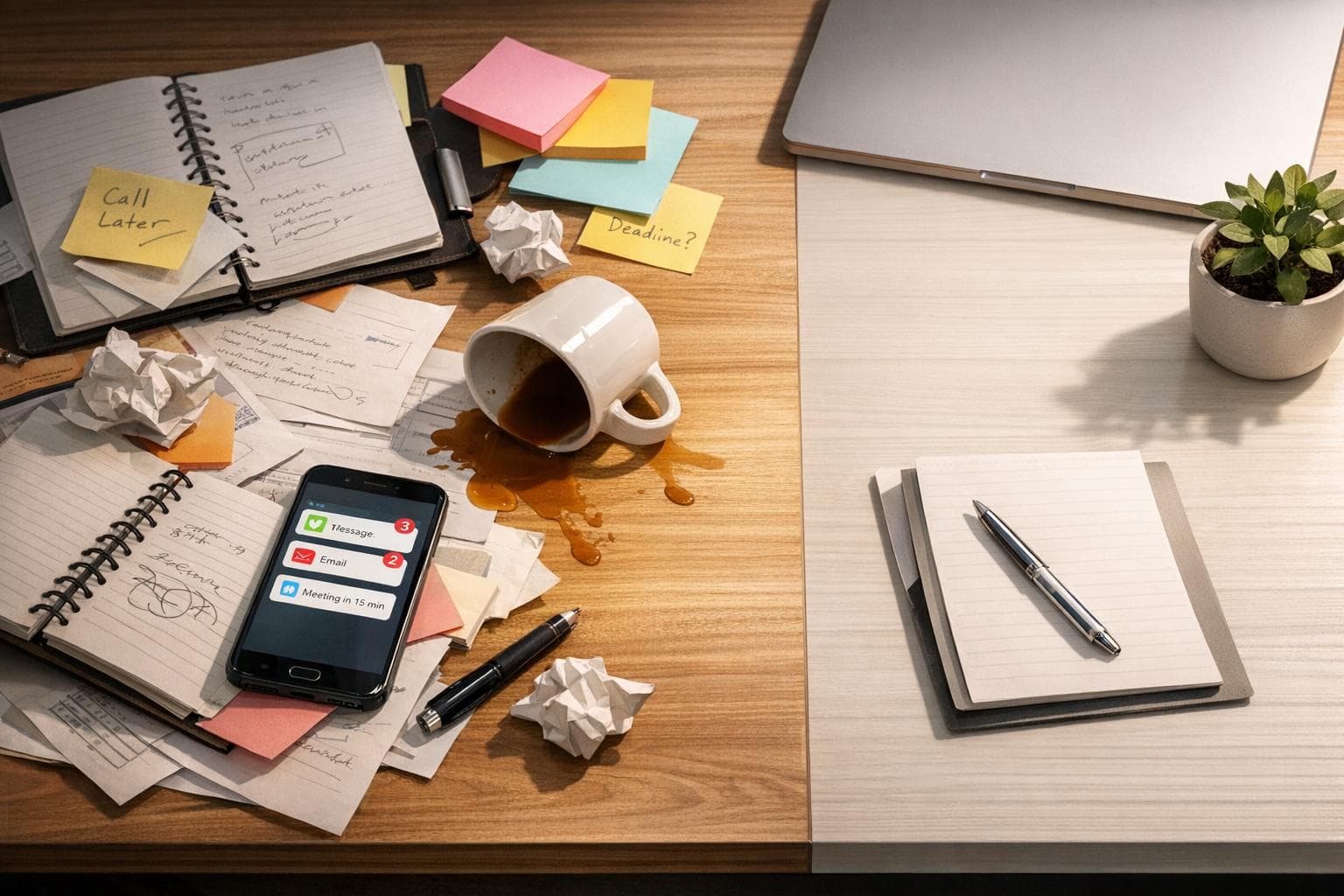
Why You Lose Focus During Work: 5 Common Causes
Struggling to stay focused at work? You're not alone. Constant distractions, mental fatigue, and unclear tasks can drain your productivity. Research shows interruptions can take up to 20 minutes to recover from, and multitasking can slash efficiency by 40%. Here’s why your focus slips and what you can do about it:
- Digital Distractions: Notifications and screen time pull your attention away. Americans check their phones 80 times a day, with 45% of alerts being irrelevant.
- Multitasking: Switching between tasks leads to scattered focus, memory lapses, and a 40% productivity drop.
- Unclear Tasks: Vague goals or oversized projects cause procrastination and overwhelm.
- Mental Fatigue: Lack of sleep and energy mismatches leave you feeling drained and unfocused.
- Chaotic Workspaces: Clutter and noise compete for your attention, reducing efficiency.
Solutions include: setting notification boundaries, single-tasking with time blocks, breaking tasks into smaller steps, aligning tasks with energy levels, and organizing your workspace. Tools like macOS Focus modes and apps like Focusmo can help streamline these strategies.
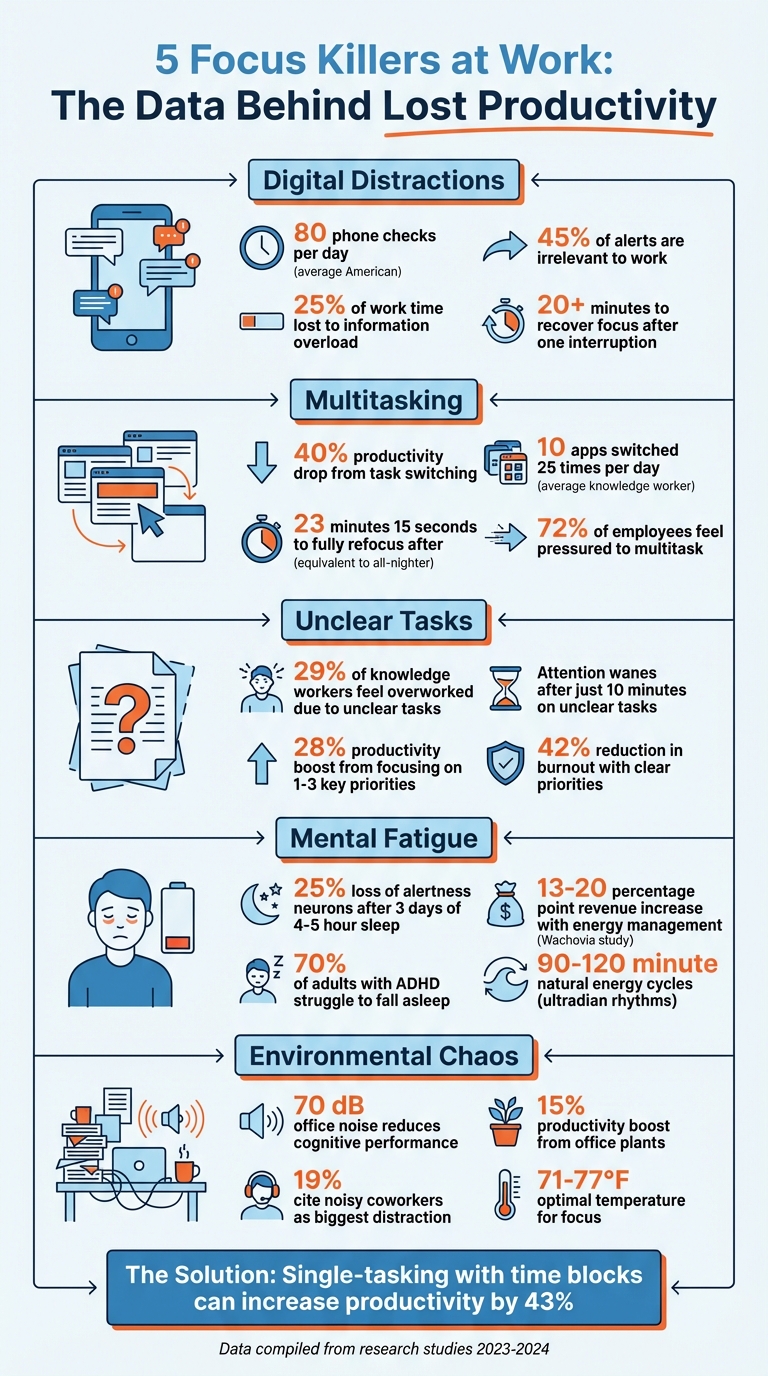
5 Focus Killers at Work: Statistics and Impact on Productivity
Digital Distractions and Constant Notifications
Problem: Screen and Notification Overload
A buzzing phone, a Slack ping, or an email alert - each one pulls you away from your task and derails your workflow. It’s not just the interruption itself that’s costly; regaining focus after even a single notification can take over 20 minutes. And here’s the kicker: just seeing your smartphone nearby can lower your cognitive performance.
On average, Americans check their phones 80 times a day. At work, nearly half of all alerts - about 45% - aren’t even relevant to the job at hand. All this adds up, with U.S. workers losing approximately 25% of their time to the constant barrage of information.
The impact of digital distractions goes beyond wasted time. Social media notifications, for example, trigger a reward loop that can make everyday tasks feel dull and unmotivating. For individuals with ADHD traits, the problem is even more pronounced. The constant novelty and stimulation make it nearly impossible to resist distractions, further exploiting impulsivity.
"In modern life, we're essentially living in a room filled with distractions all the time, thanks to the competing demands of work and home life... and the constant temptation of phones",
says Margaret Sibley, Professor of Psychiatry and Behavioral Sciences at the University of Washington.
Switching between tasks too often doesn’t just slow you down - it can lead to a 40% drop in productivity. So, how do you reclaim your focus? Let’s explore how macOS tools and the features of Focusmo can help you set boundaries and stay on track.
Solution: Set Digital Boundaries with Mac Tools
Your Mac has built-in tools designed to combat notification overload. For instance, macOS Focus modes allow you to silence non-essential alerts and decide which apps can interrupt you during deep work. You could create a "Work" focus mode that filters out unnecessary distractions or even go completely silent during your most demanding tasks.
Focusmo steps in to elevate this even further. It combines notification management with features like automatic time tracking and distraction blocking. When you start a work session, Focusmo can block websites and apps that tend to pull you off course. Its built-in Pomodoro timer is another handy tool, guiding you through 25-minute bursts of focused work, followed by short breaks.
Here are three strategies to help you maximize focus:
- Batch notifications into scheduled blocks: Dedicate two or three 30-minute slots each day specifically for handling emails and messages. This minimizes interruptions during your core work hours.
- Create physical distance from your phone: Simply placing your phone in another room during high-priority tasks can make a big difference. Studies show that even having your phone in sight reduces cognitive capacity. Pair this with Focusmo’s distraction-blocking features, and you’ve got a solid defense for your attention.
- Use focused time intervals: Try the 15-minute timer technique. Commit to working on a single task for just 15 minutes without any interruptions. Over time, this builds what researchers call "focus muscle memory." Focusmo’s detailed activity timeline can also help you track how you’re spending your time and make adjustments as needed.
sbb-itb-8245ce4
Multitasking And Constant Context Switching
Problem: The Cost Of Doing Too Much At Once
Let’s face it - multitasking is a myth. What actually happens is your brain rapidly switches between tasks, leaving your focus scattered and your memory drained .
The constant switching comes at a steep price. Studies show it can cut productivity by up to 40%. Every transition eats away at time, energy, and focus, leaving you distracted and less effective at whatever you're working on .
Here’s a striking example: the average knowledge worker bounces between 10 different apps up to 25 times a day. And after just one interruption, it takes roughly 23 minutes and 15 seconds to fully refocus on what you were doing. Even worse, juggling multiple tasks and messages can temporarily drop your IQ by 10 points - a hit that’s more than double the effect of smoking marijuana and comparable to pulling an all-nighter.
"Multitasking is a myth. What you're really doing is switching between tasks. It's almost always more efficient to focus on one task at a time."
- Dr. Sahar Yousef, Cognitive Neuroscientist, UC Berkeley
For those with ADHD, the impact is even greater. ADHD directly affects executive functions in the brain - like planning and directing attention - which makes constant switching especially exhausting. It can also ramp up stress, frustration, and even cause physical symptoms like spikes in heart rate and blood pressure. With 72% of employees feeling pressured to multitask during their workday and 71% of knowledge workers reporting burnout in the past year, it’s clear that this isn’t sustainable.
The solution? A more disciplined approach that prioritizes focus over multitasking: single-tasking with time blocks.
Solution: Single-Task With Time Blocks
Time blocks are a simple yet powerful way to combat the chaos of multitasking. By dedicating specific chunks of your day to one task at a time, you can avoid the mental overload caused by constant switching.
Start your day by identifying your 1–3 Most Important Tasks (MITs). As Steve Jobs famously said, "Focusing is about saying 'no'". Once you’ve identified your priorities, group similar tasks together. For instance, instead of checking email constantly, set aside two or three 30-minute blocks just for handling messages. This approach, known as task batching, significantly reduces the number of context switches.
Tools like Focusmo make this strategy even easier to implement. Its hourly check-ins help you stay accountable to your current task, while the floating island feature keeps your focus front and center. Plus, with automatic time tracking, you can see exactly how you’re spending your hours and adjust your time blocks accordingly.
For shorter, focused sessions, try the Pomodoro Technique: work for 25 minutes, then take a 5-minute break. Focusmo’s built-in Pomodoro timer takes care of the timing for you. Research shows that using structured single-tasking blocks - sometimes called "Focus Sprints" - can increase productivity by 43% .
Protecting your time blocks is just as important as creating them. Use tools like macOS "Do Not Disturb" mode to silence notifications during deep work. Close unnecessary browser tabs and apps to reduce distractions. Focusmo’s distraction blocking feature can even prevent you from accessing websites and apps that tend to derail your focus.
Poor Task Clarity And Overwhelm
Problem: Unclear And Overly Broad Tasks
When tasks lack clear boundaries or feel too broad, it can lead to planning paralysis and procrastination. Why? Because vague tasks demand a lot from your brain’s executive function - the part responsible for planning, decision-making, and maintaining focus. Without clear direction, your brain struggles to even start organizing the task.
"Executive function helps you plan, make decisions, and perhaps most important, pay attention."
- Lydia Cho, Clinical Psychologist and Neuropsychologist, McLean Hospital
Undefined or oversized projects can feel overwhelming, often leading to avoidance. For individuals with ADHD, this issue is even more pronounced. Lower dopamine levels make it harder to stay motivated when faced with unclear or uninteresting tasks. Without clear steps, prioritization becomes a challenge, and it’s easy to get stuck in low-value activities, like endlessly checking emails, instead of making meaningful progress.
This lack of clarity isn’t just a personal issue - it’s widespread. About 29% of knowledge workers report feeling overworked because they don’t fully understand their tasks or roles. And research shows that attention can start to wane just 10 minutes into a task if it’s not clearly defined.
So, how can you break this cycle? It starts with breaking tasks into smaller, actionable steps.
Solution: Break Down Tasks And Visualize Progress
One of the best ways to combat unclear tasks is by breaking them into smaller, manageable pieces - a technique often called "task chunking". For example, instead of setting a vague goal like "finish article", break it into specific steps, such as "write the introduction" or "find three reliable sources."
"Committing oneself to a firm number like 25 minutes or so can make beginning the task seem less daunting as you know it has an end point."
- Lydia Cho, Clinical Psychologist and Neuropsychologist, McLean Hospital
Another helpful strategy is to focus on just 1–3 key priorities each day. These Most Important Tasks (MITs) help you stay on track and can significantly improve productivity - by as much as 28% - while also reducing burnout by 42%.
Tracking your progress visually can also make a big difference. Seeing your progress triggers dopamine release, boosting your motivation. Tools like Focusmo make this easier by keeping your priorities visible with features like floating task reminders and daily lists. The app even tracks how long tasks take, helping you plan more effectively.
Visual timers are another great tool. They counteract distorted time perception, a common challenge for those with ADHD. Even starting a tiny part of a task - like opening a document and typing a title - can activate the Zeigarnik Effect, which keeps the unfinished task fresh in your mind and encourages you to keep going.
Mental Fatigue, Sleep Debt, And Energy Mismatch
Problem: Low Energy And Decision Fatigue
It's not just external distractions that drain your focus - your internal energy levels play a huge role too. Your brain needs rest to function properly. When you push through exhaustion, you're dealing with real physiological changes that make it harder to concentrate. For example, sleep deprivation directly affects working memory, slows down cognitive processing, and weakens your ability to focus on tasks. Even missing just one night of sleep can leave your brain struggling to filter out distractions from your environment.
Research on mice shows that three consecutive days of sleeping only four to five hours can lead to a 25% loss of locus ceruleus neurons, which are critical for staying alert. The result? Brain fog, constant yawning, and a feeling like you're trudging through wet cement. You might find yourself misplacing important items, forgetting details from conversations, or struggling to finish even routine tasks.
Mental fatigue also messes with your decision-making. When you're tired, glutamate builds up in the lateral prefrontal cortex, making your brain lean toward quick, easy rewards instead of well-thought-out choices. As Mathias Pessiglione from the Paris Brain Institute puts it:
"The sensation of fatigue is protective - a warning that the brain is nearing a physiological boundary and it's time to rest."
For adults with ADHD, this problem is magnified. Over 70% of adults with ADHD struggle to fall asleep, creating a cycle where poor rest further disrupts focus. The inability to "turn off" the mind leads to what Dr. William Dodson calls "perverse sleep" - staying awake when you need to sleep and feeling sleepy when you should be awake. Understanding your energy patterns can help you work smarter, not harder.
Solution: Match Work To Energy Levels And Take Regular Breaks
Instead of battling your energy dips, try working with them. Your body naturally follows ultradian rhythms, which are 90- to 120-minute cycles where energy rises and falls. Ignoring the natural low points in these cycles can lead to restlessness and reduced focus.
Start by figuring out your chronotype. Are you someone who thrives in the early morning (AM-shifted)? Do you hit your stride between late morning and early afternoon (Bi-phasic)? Or are you more productive later in the day (PM-shifted)? Once you know, plan your tasks accordingly: tackle demanding work during peak energy times and save lighter tasks, like checking emails, for when your energy dips.
| Chronotype | Peak Focus Period | Recommended Task Strategy |
|---|---|---|
| AM-shifted | Early morning | Start with creative or challenging tasks. |
| Bi-phasic | 10:00 AM – 2:00 PM | Prioritize big projects before lunch or after a break. |
| PM-shifted | Late afternoon/Evening | Handle low-effort tasks in the morning; save deep work for later. |
Here’s a real-world example: In 2006, Wachovia Bank tested an energy management program with 106 employees across 12 branches in New Jersey. Participants took regular breaks and ate small meals every three hours to stabilize glucose levels. The results? Over three months, this group outperformed a control group by 13 percentage points in loan revenue and 20 percentage points in deposit revenue.
To stay sharp, work in focused blocks of 90 to 120 minutes, then take a real break. Even a quick 10-minute walk can boost blood flow to your prefrontal cortex, helping you regain focus. Tools like Focusmo can remind you to take breaks and track how long tasks actually take, so you can align your schedule with your energy levels.
For those with ADHD who struggle to wake up, the "two-alarm" system can help: set an alarm an hour before you need to get up, take any prescribed stimulant medication, and then go back to sleep until a second alarm wakes you up. This way, you’ll feel more alert and ready to tackle the day when it starts.
How to Enhance Focus and Improve Productivity | Dr. Cal Newport
Environment And Sensory Overload
Your physical workspace is more than just a setting - it directly impacts your ability to focus and stay productive.
Problem: Noisy or Cluttered Workspaces
A cluttered or noisy workspace isn't just annoying; it actively competes for your attention. That messy pile of papers on your desk or the scattered sticky notes in your line of sight? They’re not as harmless as they seem. Studies show that visual clutter can drain your focus and mental energy, even if you think you're ignoring it.
Noise is another major culprit, especially in open-plan offices. Conversations at around 70 dB - the typical noise level for office chatter - can significantly reduce cognitive performance. In fact, 19% of employers say noisy coworkers are one of the biggest distractions in the workplace. These interruptions don’t just slow you down; they can also increase the chances of making mistakes by 12%.
For individuals with ADHD or sensory sensitivities, the impact of these distractions is even greater. Their brains are already working harder to filter out irrelevant stimuli, so a noisy or visually chaotic environment can lead to heightened stress and even physical discomfort. Clearly, creating a workspace that minimizes these distractions is essential for maintaining focus.
Solution: Create a Focus-Friendly Workspace
To combat clutter, try the "arms-reach rule": keep only the items you use frequently within arm’s reach, and store everything else in drawers or cabinets. This simple change can help reduce visual distractions and free up mental bandwidth.
Noise can be managed with noise-canceling headphones, paired with steady background sounds like pink noise or nature sounds. If music is your thing, you’re not alone - 86% of people say they feel more productive when listening to music while working.
Lighting is another key factor. Bright, cool light (between 5000–6500K) in the morning can help you stay alert, while warmer, dimmer light (2700–3000K) in the evening supports your natural sleep-wake cycle. Temperature matters, too. The sweet spot for peak cognitive performance is between 71°F and 77°F (22–25°C). Workspaces that are too cold can lead to more errors.
Adding plants to your desk can also make a surprising difference. Research shows that having office plants can boost productivity by 15% and reduce stress. Plants provide "soft fascination", which helps your brain recover from attention fatigue. If you share a workspace, simple signals like a closed door or a "busy" sign can let others know when you need uninterrupted time.
On the digital front, tools like Focusmo can help by offering a minimalist interface that cuts down on screen clutter. If you're using macOS, try virtual desktops to separate tasks - one for deep work and another for communication. This setup reduces the mental load of switching between tasks. For an extra layer of focus, enable grayscale mode on your Mac to make colorful icons and notifications less distracting.
Conclusion
Losing focus often comes down to a mix of digital distractions, juggling too many tasks at once, unclear goals, mental exhaustion, and a chaotic environment. Tackling these challenges together can help you regain and maintain your concentration.
Simple steps like setting boundaries with technology, focusing on one task at a time, breaking big projects into smaller pieces, aligning tasks with your natural energy levels, and organizing your workspace can lighten your mental load. These strategies are particularly helpful for the 8.7 million adults in the U.S. living with ADHD, but they’re just as effective for anyone aiming to improve their focus.
As industry leaders point out, staying focused isn’t about sheer willpower.
"Focus is a filter, not a muscle. Stop trying to brute force yourself into focus." – Dan Martell, CEO and Author
Creating a workflow that sticks requires rhythm and consistency rather than constant effort. Use triggers - like sitting in a specific chair, playing a particular playlist, or dedicating a set time block - to signal to your brain that it’s time to work . Tools like Focusmo bring these strategies together with features like hourly check-ins, distraction blockers, and Pomodoro timers to help you stay on track. Protecting your attention is critical, as interruptions can derail your focus .
Start small: silence nonessential notifications during your first hour of work or clear a single square foot of your desk. These little changes add up, making focus feel less like a battle and more like a natural habit. With the right tools and adjustments, you can keep distractions at bay and build a workflow that works for you.
FAQs
How can I stay focused and minimize digital distractions at work?
To cut down on digital distractions, start by taking control of your notifications. Turn off non-essential alerts on your devices and enable Do Not Disturb or focus modes during periods of deep work. Instead of reacting to every ping, set specific times to check emails and messages - like a brief scan at the start of each hour. If you're using macOS, tools like Screen Time can help you restrict access to distracting websites, or you can rely on browser extensions to block them during work hours.
Develop habits that support concentration by focusing on one task at a time. Close unrelated tabs, keep only the apps you need open, and use methods like time-blocking or the Pomodoro technique to organize your day. Before diving into a task, jot down a clear intention to keep yourself on track. Placing your phone out of sight - or even in airplane mode - can also help you stay focused. Make it a habit to review how you spend your time, so you can spot patterns and tweak your routine to work more efficiently.
What makes single-tasking more effective than multitasking?
Focusing on one task at a time - known as single-tasking - can sharpen your concentration, lower stress levels, and elevate the quality of your work. Unlike multitasking, which often scatters your attention and increases the likelihood of mistakes, single-tasking lets your brain zero in on a single activity. This not only enhances clarity but also improves how efficiently you get things done.
When you dedicate your full attention to a single task, you’re likely to finish it quicker and with greater accuracy. Plus, this method helps conserve your mental energy, leaving you more refreshed and capable for the rest of the day. It’s an effective way to sustain productivity over the long haul and steer clear of burnout.
How can I match my work schedule to my energy levels?
Matching your tasks to your natural energy levels can make a big difference in how focused and productive you feel throughout the day. Start by paying attention to your energy patterns. For example, many people feel sharp and focused in the morning, hit a sluggish patch after lunch, and then get a second wind in the late afternoon. Use this knowledge to your advantage: tackle challenging tasks like brainstorming or problem-solving when your energy is at its peak, and save routine tasks - like answering emails or organizing files - for those slower moments.
Make the most of your high-energy hours by cutting out distractions. Turn off non-essential notifications, enable a "focus mode" on your devices, and experiment with time-management techniques like time-blocking or the Pomodoro method, where you work for 25 minutes and then take a 5-minute break. If you find your concentration waning, a quick reset can help - stand up, stretch, or grab a glass of water to recharge.
Don’t underestimate the power of good sleep in maintaining steady energy levels. Aim for 7–9 hours of rest each night, stick to a consistent bedtime, and avoid caffeine after 2 p.m. By combining quality sleep, smart scheduling, and strategies to stay focused, you can align your workday with your natural energy highs and lows for better results.