Pomodoro Technique vs Time Blocking: Which Works Better?
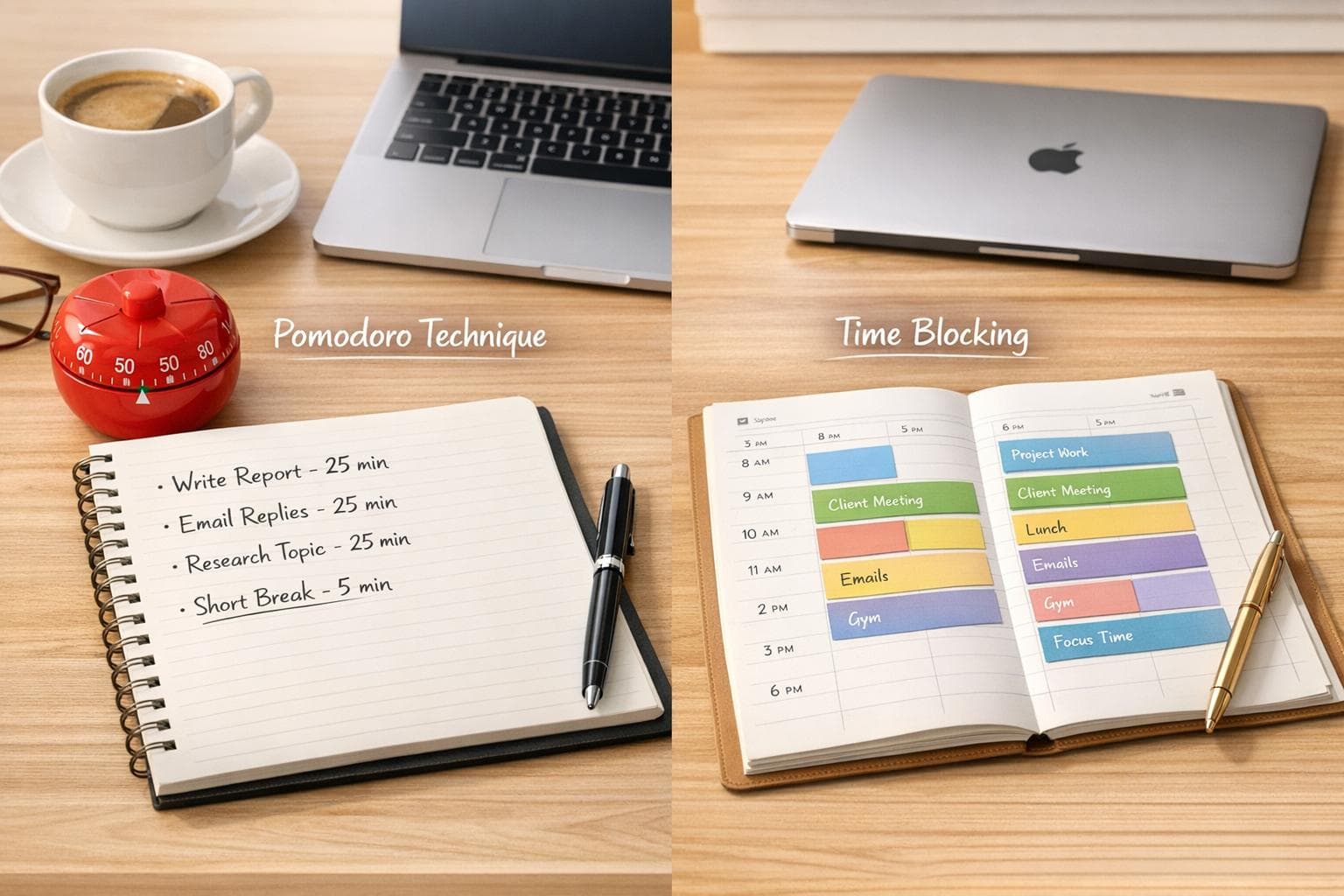
Pomodoro Technique vs Time Blocking: Which Works Better?
When it comes to managing your time, Pomodoro Technique and Time Blocking are two popular methods - but which one works best for you? Here's the quick answer:
- Pomodoro Technique: Breaks tasks into 25-minute focus intervals with short breaks. It's great for staying motivated, tackling procrastination, and managing small or repetitive tasks.
- Time Blocking: Schedules your day into specific time slots for tasks. It's ideal for planning ahead, reducing decision fatigue, and focusing on deep, complex projects.
Both methods can help with productivity, especially for those with ADHD or time blindness. Pomodoro keeps you moving with short bursts of work, while Time Blocking provides a structured daily roadmap. For the best results, many find a mix of both methods works well.
Quick Comparison
| Feature | Pomodoro Technique | Time Blocking |
|---|---|---|
| Core Unit | 25-minute focus sessions | Flexible time slots |
| Planning Style | Reactive (task-by-task) | Proactive (day or week overview) |
| Breaks | Frequent, built-in (5 minutes; longer after 4 cycles) | Scheduled manually as needed |
| Ideal Task Type | Small, varied, or mentally draining tasks | Deep work, complex projects |
| Flexibility | High (easy to swap tasks) | Low (harder to adjust once planned) |
Want to boost productivity? Use Pomodoro for focus and momentum, and Time Blocking for structure and planning. Keep reading to learn how each method works and which one fits your workflow.
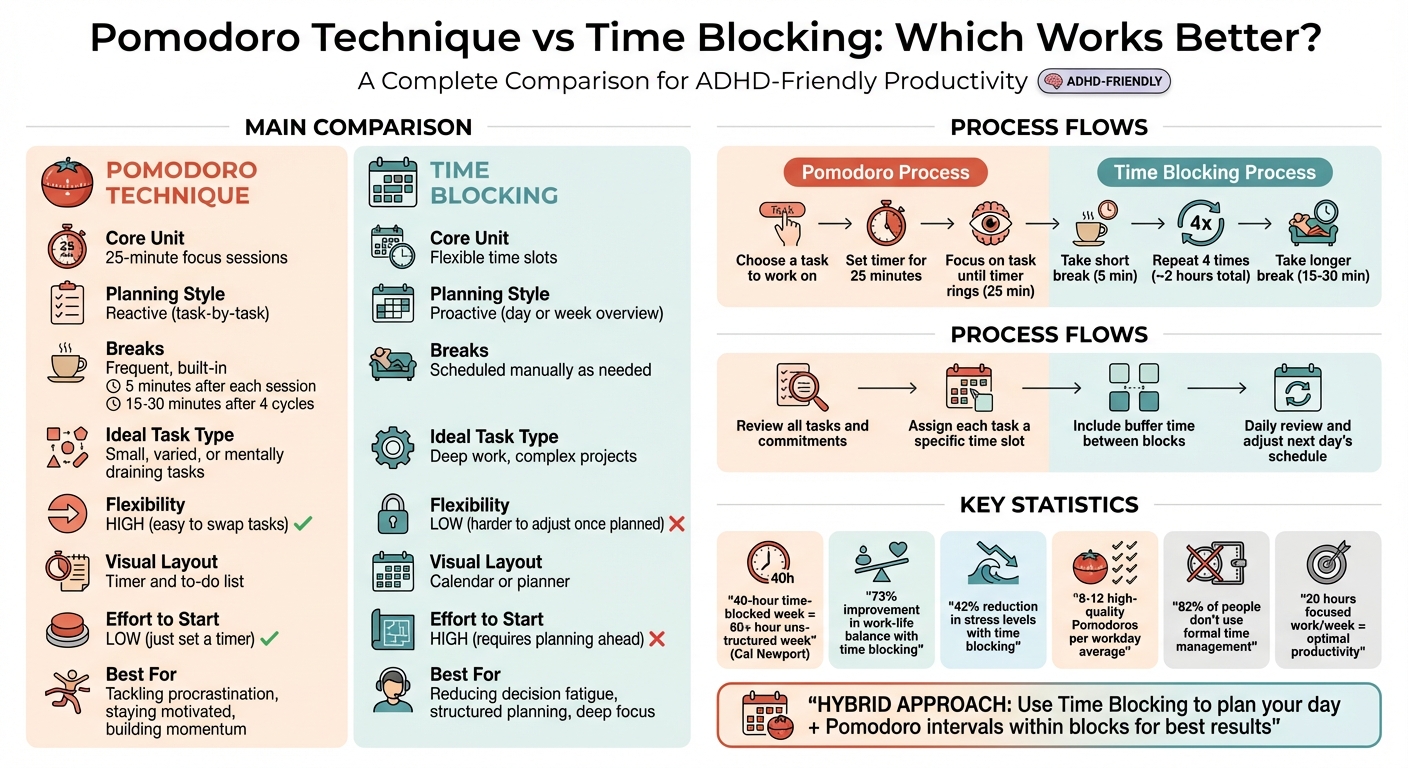
Pomodoro Technique vs Time Blocking: Complete Comparison Guide
Time-Blocking vs Pomodoro: The Ultimate Productivity Showdown!
What Is the Pomodoro Technique?
The Pomodoro Technique is a time management method that breaks work into focused 25-minute intervals, known as "pomodoros", followed by short 5-minute breaks. It was created in the late 1980s by Francesco Cirillo, who named it after the Italian word for tomato, inspired by the tomato-shaped kitchen timer he used during his early experiments with the technique.
At its core, this method shifts how we view time. Instead of seeing it as a source of stress or something slipping away, each completed pomodoro becomes a small, measurable success. This approach can be especially helpful for those dealing with tight deadlines or struggling to stay focused, such as individuals with ADHD.
How the Pomodoro Technique Works
Here’s how the Pomodoro Technique operates step by step. Start by choosing one task to focus on. Then, set a timer for 25 minutes and work only on that task until the timer goes off. Afterward, take a 5-minute break to rest. Once you've completed four pomodoros, enjoy a longer break of 15–30 minutes to recharge.
| Step | Action | Duration |
|---|---|---|
| 1 | Choose a task to work on | N/A |
| 2 | Set the timer | 25 minutes |
| 3 | Focus on the task until the timer rings | 25 minutes |
| 4 | Take a short break | 5 minutes |
| 5 | Repeat the process four times | ~2 hours |
| 6 | Take a longer break | 15–30 minutes |
Once the timer starts, the goal is to work uninterrupted until it rings. If you finish early, use the remaining time to review or refine your work. However, if you're interrupted, that pomodoro is considered void and needs to be restarted. To handle interruptions, Cirillo suggests the "inform, negotiate, schedule, call back" strategy. For smaller tasks, like responding to emails, you can group them into a single pomodoro. Larger projects should be broken into smaller, actionable steps for better focus.
Why the Pomodoro Technique Helps with ADHD
For individuals with ADHD, the Pomodoro Technique can be a game-changer. It breaks overwhelming tasks into smaller, manageable pieces and includes regular breaks that encourage movement and rest. Isaac P. Tourgeman, PhD, an Assistant Professor at Albizu University, explains that focusing for just 25 minutes is far less daunting than committing to an hour or more, which helps counteract boredom and distractibility.
A 2025 meta-analysis highlighted the benefits of structured Pomodoro sessions, showing they improve focus, reduce fatigue, and enhance overall performance. By working in defined time blocks, the technique also addresses the "planning fallacy", where people underestimate how long tasks will take. On average, most individuals complete 8 to 12 high-quality pomodoros in a workday. This structured approach makes it easier to set realistic goals and avoid overloading your schedule, making it a practical productivity tool for those with ADHD.
What Is Time Blocking?
Time blocking is a productivity technique where you schedule your day into specific chunks of time, dedicating each block to a particular task or group of tasks. Unlike a traditional to-do list, which can feel open-ended, time blocking turns your plans into actionable calendar appointments with clear start and end times.
"Knowing what the day 'means' to me allows me to get the things I need and want to accomplish without seeing undetermined 'ought to do' items on a to do list."
This quote from Mike Vardy, Founder of Productivityist, perfectly sums up the goal of time blocking: having a clear, pre-planned roadmap that removes the need for constant decision-making about what to do next.
One of the biggest advantages of time blocking is how it encourages deep focus by cutting down on constant context switching. When you dedicate uninterrupted time to a specific task, you reduce "attention residue" - the mental drag that happens when part of your brain stays stuck on a previous activity.
Consider this: a study revealed that 82% of people don’t use a formal time management system, and of those, only 20% feel in control of their daily workload. Cal Newport, author of Deep Work, highlights the power of time blocking by stating:
"a 40 hour time-blocked work week produces the same amount of output as a 60+ hour work week pursued without structure."
[26,4]
How Time Blocking Works
Now that we’ve defined time blocking, let’s break down how to use it. Start by reviewing all your tasks and commitments, then assign each one a specific time slot on your calendar. For instance, you might block 9:00 AM to 11:00 AM for writing a report, 11:00 AM to 12:00 PM for catching up on emails, and 2:00 PM to 4:00 PM for tackling a client project. Each block is a promise to focus exclusively on that task during the allotted time.
This approach helps you avoid reacting impulsively to distractions. Instead, you follow a well-thought-out plan created when your mind is clear. To make the system work smoothly, be sure to include buffer time between tasks. This extra padding accounts for unexpected delays or tasks that take longer than planned. If you’re new to time blocking, it’s wise to overestimate how long tasks will take - most people underestimate task duration by 20% to 30%.
Another important tip: align your blocks with your natural energy levels. Schedule demanding tasks, like creative or analytical work, during your peak hours (often the morning for many people). Save routine or administrative tasks for times when your energy dips. At the end of each day, take a few minutes to review what you accomplished and adjust the next day’s schedule as needed. This daily review keeps your plan realistic and helps refine your approach over time.
Why Time Blocking Helps with ADHD
For individuals with ADHD, time blocking can be a game changer. It offers a clear structure that helps combat time blindness and reduces decision fatigue. Instead of constantly deciding what to tackle next, you rely on a pre-made plan, conserving mental energy for focused work.
Time blocking also addresses one of the biggest challenges for ADHD brains: context switching. Multitasking can reduce productivity by 40% and increase neural fatigue by 25%. By dedicating uninterrupted blocks to single tasks, you avoid the mental toll of constantly shifting focus. In fact, professionals who adopt structured time management methods like time blocking have reported up to a 50% boost in overall productivity.
This method doesn’t just help with focus - it creates a sense of control and accomplishment, making it easier to stay on track and get things done.
Pomodoro Technique vs Time Blocking: Main Differences
Both the Pomodoro Technique and Time Blocking aim to help you work smarter, but they go about it in very different ways. Pomodoro relies on fixed 25-minute intervals, where you focus on one task at a time, guided by a timer. On the other hand, Time Blocking is all about pre-planning your schedule by assigning specific tasks to flexible time blocks.
One of the key contrasts lies in their flexibility. Pomodoro is strict about sticking to its 25-minute intervals but gives you the freedom to choose or swap tasks between those intervals. Time Blocking, however, allows you to adjust the length of your time blocks but becomes more rigid once your schedule is set, making it harder to adapt if interruptions arise. Pomodoro helps you build momentum with its short, consistent cycles, while Time Blocking reduces the mental strain of switching tasks by grouping similar activities into dedicated blocks. These differences highlight how each method serves distinct needs and preferences.
Here’s a side-by-side comparison to make it clearer:
| Feature | Pomodoro Technique | Time Blocking |
|---|---|---|
| Core Unit | 25-minute "Pomodoros" | Flexible time blocks |
| Primary Goal | Maintaining focus and rhythm | Intentional schedule control |
| Breaks | Frequent, built-in (5 minutes; longer after 4 cycles) | Scheduled manually as needed |
| Planning Style | Reactive (task-by-task) | Proactive (day/week overview) |
| Ideal Task Type | Small, varied, or mentally draining tasks | Deep work, complex projects |
| Visual Layout | Timer and to-do list | Calendar or planner |
| Effort to Start | Low (just set a timer) | High (requires planning ahead) |
| Flexibility | High (easy to swap tasks) | Low (less adaptable once set) |
For many, combining the two methods creates a powerful hybrid approach. For instance, you can use Time Blocking to carve out large chunks of your day for specific types of work and then apply Pomodoro intervals within those blocks. This way, you get the structured planning of Time Blocking paired with the focus-boosting cycles of Pomodoro. It’s a great way to stay on track while avoiding burnout.
Next, we’ll dive deeper into the pros and cons of each method to help you decide how to use them effectively - especially if you're looking for ADHD-friendly productivity solutions on Mac.
Pomodoro Technique: Pros and Cons
The Pomodoro Technique simplifies task management by breaking work into focused 25-minute sessions with short breaks in between. This structure helps combat distractions, which research shows account for nearly half of all interruptions during the workday. By setting fixed intervals, the method clearly separates work from rest, making time feel more tangible. For example, instead of vague deadlines, you might think, "This report will take about four Pomodoros." Francesco Cirillo, the creator of the method, summed it up perfectly:
"Concentration and consciousness lead to speed, one Pomodoro at a time"
For people with ADHD, the gamified nature of this technique makes time easier to grasp. While these structured intervals can enhance productivity, the method isn’t without its challenges.
One major drawback is how it can interrupt deep focus, especially during tasks that require extended concentration. Mike Vardy, founder of Productivityist, critiques this aspect:
"The rigidity of the 25-minute productivity block not only forces you to step away, but it also prompts you to move on to another task. I'm not a fan of systems that are that rigid"
Research indicates it can take over 20 minutes to regain focus after being disrupted. This rigidity also makes the technique less effective in collaborative environments, where unexpected interruptions often occur, forcing users to restart sessions and lose momentum.
Balancing these advantages and disadvantages is key, especially when integrating the Pomodoro Technique into workflows or using Mac productivity tools.
| Pros | Cons |
|---|---|
| Breaks tasks into manageable chunks, reducing procrastination | Can disrupt deep focus needed for creative work |
| Encourages regular breaks to prevent burnout | Too rigid for tasks that require sustained attention |
| Helps improve time estimation skills | Challenging to use in team-based or reactive roles |
| Boosts focus and reduces mental fatigue | Requires constant attention to the timer |
| Provides frequent "fresh starts" to maintain motivation | External interruptions can derail sessions entirely |
sbb-itb-8245ce4
Time Blocking: Pros and Cons
Time blocking organizes your day with precision, aiming to boost productivity. By pre-scheduling tasks, it helps cut down on decision fatigue - the mental exhaustion that comes with constantly figuring out what to do next. For people with ADHD, this method can be particularly helpful. It provides external structure, addressing time blindness, which is the difficulty in gauging how much time has passed or remains. According to professionals, time blocking has been linked to a 73% improvement in work–life balance and a 42% reduction in stress levels. While these benefits are compelling, the method isn't without its challenges.
The structured nature of time blocking can sometimes work against you. A single unexpected meeting or emergency can throw off your entire schedule. For individuals with ADHD, this rigidity might even increase decision overload. Another drawback is the planning fallacy - tasks often take longer than expected, with durations underestimated by about 27%. This can lead to crammed schedules and added stress. Mike Vardy, Founder of Productivityist, highlights one of the upsides of time blocking:
"Knowing what the day 'means' to me allows me to get the things I need and want to accomplish without seeing undetermined 'ought to do' items on a to do list"
Unlike simpler productivity methods like the Pomodoro Technique - which only requires a timer - time blocking involves a lot of upfront planning and self-discipline. For some with ADHD, this extensive planning can lead to decision paralysis. These challenges are important to keep in mind when adapting time blocking strategies for ADHD users on Mac.
| Pros | Cons |
|---|---|
| Supports extended focus and deep work sessions | Can fall apart when interruptions arise |
| Reduces decision fatigue and minimizes context switching | Requires precise time estimation and heavy planning |
| Helps manage time blindness with visual schedules | Prone to the planning fallacy, with tasks underestimated by 27% |
| Establishes clear boundaries between work and personal life | May lead to overwork if breaks aren’t scheduled |
| Limits perfectionism by enforcing fixed time slots | Less suitable for reactive or highly spontaneous roles |
Which Method Works Better for ADHD on Mac?
There’s no one-size-fits-all answer here - the right method depends on the specific challenges ADHD presents for you. If getting started on tasks feels like climbing a mountain, the Pomodoro Technique might be your best bet. Committing to just 25 minutes can feel far less daunting than staring at an open calendar slot. Plus, the simple act of starting a timer can help you push past that initial mental block.
On the flip side, if you often find yourself stuck wondering, "What do I tackle next?", Time Blocking could be the solution. Pre-planning your day removes the burden of constant decision-making, which can be especially tough when your executive function is struggling. Cal Newport, author of Deep Work, explains it well:
"a 40‐hour time‐blocked work week produces the same amount of output as a 60+ hour work week pursued without structure".
For Mac users, this structured approach can provide a clear roadmap to follow throughout the day. Choosing the right method for your needs is the first step toward tailoring Mac's tools to better support ADHD-specific challenges.
Mac users with ADHD often benefit from visual cues and reminders to combat time blindness. Aiden Thompson, a software engineer, highlights this:
"The blue waves in banner really helps me visualize time especially when I am time blind, really helps the ADHD brain. I have it always visible so I get reminded constantly of my current task".
Tools that keep tasks visible - like pinning them to the top of your screen - can act as a steady anchor, keeping you grounded and focused.
For many professionals with ADHD, a hybrid approach works wonders. For example, you can use your Mac’s calendar to block off broad work categories (e.g., "9:00 AM–12:00 PM: Deep Work") and then run Pomodoro sessions within those blocks. This combination leverages the structure of time blocking with the momentum-building power of timed sessions, creating a balance that helps overcome procrastination.
When planning your day on a Mac, it’s smart to overestimate how long tasks will take and include buffer time for unexpected distractions. Tools that deliver persistent reminders - like hourly check-ins asking, "What are you doing?" or "What’s next?" - can help keep your focus on track and your productivity in check.
Using Focusmo to Customize Pomodoro and Time Blocking on Mac
Focusmo steps beyond the limitations of traditional Pomodoro apps by allowing you to tailor timer durations to your needs, rather than sticking to the standard 25-minute work intervals and fixed break schedules. For example, you could set a 15-minute timer for checking emails, a 30-minute block for writing, or even dedicate 90 minutes to deep coding work. This level of flexibility is especially helpful for individuals with ADHD, who often find rigid timing structures more of a hindrance than a help.
What makes Focusmo stand out is its ability to combine planning and execution seamlessly. The app supports Timeboxing, an approach that mixes the structured scheduling of Time Blocking with the focused efforts of Pomodoro sessions. With this feature, you can assign specific time durations to tasks without being locked into an inflexible schedule. As Gabriel Aguiñaga, the creator of FocusMaster, puts it:
"Timeboxing gives you the freedom to experiment with timer lengths"
. This means you can create personalized sessions - like 50 minutes of work followed by a 10-minute break - and fit them into larger calendar blocks.
Focusmo also helps you stay accountable by tracking your sessions and compiling data to visualize your productivity patterns. For instance, it logs your weekly work totals, with research suggesting that 20 hours of focused work per week strikes the perfect balance for productivity without risking burnout. Additionally, the app’s floating task island keeps your current focus visible on-screen, serving as a constant reminder and helping to combat time blindness, a common challenge for ADHD users.
When it comes to breaks, Focusmo allows for a more natural approach, removing the stress often associated with rigid countdowns. Aguiñaga shares his own experience:
"Setting a timer for my breaks left me feeling anxious... I couldn't truly relax during my timed breaks"
. The app also includes distraction-blocking tools, ensuring that your Pomodoro sessions remain uninterrupted by notifications or messages from apps like Slack or email. This is particularly useful, as studies show that nearly half of all workplace distractions are self-inflicted.
To make the most of Focusmo, consider integrating it into your daily workflow by using its customizable timers and planning for 2–4 overflow sessions to handle tasks that take longer than expected. During breaks, aim for screen-free activities, as research indicates it can take up to 25 minutes to fully recover from even a short interruption. By aligning structured planning with flexible execution, Focusmo offers a productivity system that works with your ADHD brain rather than against it.
Conclusion
Both strategies can significantly improve focus and productivity for individuals with ADHD. The Pomodoro Technique is especially effective for tackling procrastination, thanks to its short, timed work intervals and frequent breaks. This makes it ideal for repetitive or mentally taxing tasks. On the other hand, Time Blocking provides a clear, visual plan for the day, addressing time blindness and reducing decision fatigue, which can help with smoother transitions between tasks.
There’s no universal solution - what works best depends on your personal workflow. The Pomodoro Technique helps with starting tasks by breaking them into manageable, timed sessions. However, many ADHD users find that combining the two methods offers the best results. A hybrid approach can help sustain focus and momentum while avoiding burnout .
Here’s a straightforward approach: experiment. Start by testing these methods on a few tasks rather than planning your entire day. Adjust the intervals to suit your needs - try 50/10 or 90/15 if the standard 25-minute Pomodoro sessions don’t feel right . Don’t forget to include buffer time between tasks; research shows it can take up to 25 minutes to regain focus after even a brief distraction.
With these principles in mind, tools like Focusmo let you tailor both techniques to your energy levels and specific task demands. Ultimately, the best method is the one that aligns with your needs and helps you navigate ADHD challenges effectively.
FAQs
How do I choose between the Pomodoro Technique and Time Blocking for my tasks?
When deciding between the Pomodoro Technique and Time Blocking, it really comes down to what suits your tasks and work habits best. If you tend to lose focus or benefit from regular breaks, the Pomodoro Technique might be your go-to. It involves working in 25-minute bursts followed by 5-minute breaks, making it ideal for tasks like responding to emails, studying, or coding. On the flip side, if your day is packed with deep-focus activities like writing reports, designing, or sitting through meetings, Time Blocking might be more effective. This method lets you dedicate longer, uninterrupted stretches of time to specific tasks.
Your comfort with planning also plays a role. Time Blocking requires you to lay out your schedule in advance, which can provide structure but might feel rigid when unexpected tasks pop up. In contrast, the Pomodoro Technique offers more flexibility, allowing you to adjust as your day unfolds.
Not sure which one fits you? Test both methods for a day or a project. Pay attention to how focused and productive you feel, and tweak your approach accordingly. With Focusmo’s timer and calendar tools, you can easily explore both techniques and find the one that aligns with your workflow.
Can combining the Pomodoro Technique and Time Blocking help with ADHD productivity?
Combining the Pomodoro Technique with Time Blocking can be a game-changer for managing productivity, especially for those with ADHD. Time Blocking lays out a structured daily plan, assigning specific tasks to designated time slots, which helps reduce decision fatigue. On the other hand, the Pomodoro Technique breaks work into short, focused intervals (usually 25 minutes), followed by brief breaks, making it easier to maintain attention and avoid burnout.
When these two approaches are used together, they create a system that balances long-term planning with immediate focus. For instance, you could allocate 9:00 a.m. to 11:00 a.m. for working on a project and divide that block into four Pomodoro cycles. Each cycle consists of 25 minutes of concentrated work paired with 5-minute breaks. This method not only keeps you on schedule but also provides regular pauses to recharge, which can be particularly helpful for keeping an ADHD mind engaged.
How can I effectively use the Pomodoro Technique and Time Blocking on a Mac?
To make the most of the Pomodoro Technique and Time Blocking on your Mac, start with a Pomodoro timer app to manage your focused work sessions. Stick to the classic pattern: 25 minutes of work followed by a 5-minute break, and after four cycles, take a longer break of 15 to 30 minutes. Many apps handle the timing for you, so you can concentrate on your tasks without worrying about the clock.
For Time Blocking, take advantage of Apple Calendar to map out your day. Schedule tasks with specific start and end times, aligning them with your Pomodoro intervals. Don’t overlook breaks - add them as separate events to ensure you maintain a healthy rhythm. To minimize distractions, enable macOS Focus mode during work periods; this silences notifications and keeps unnecessary apps out of sight.
Wrap up your day by reviewing your progress. Most Pomodoro apps provide session summaries, while your calendar shows how closely you followed your plan. Use this feedback to tweak your schedule and enhance your productivity over time.