How Time Tracking Helps ADHD Productivity on Mac
How Time Tracking Helps ADHD Productivity on Mac
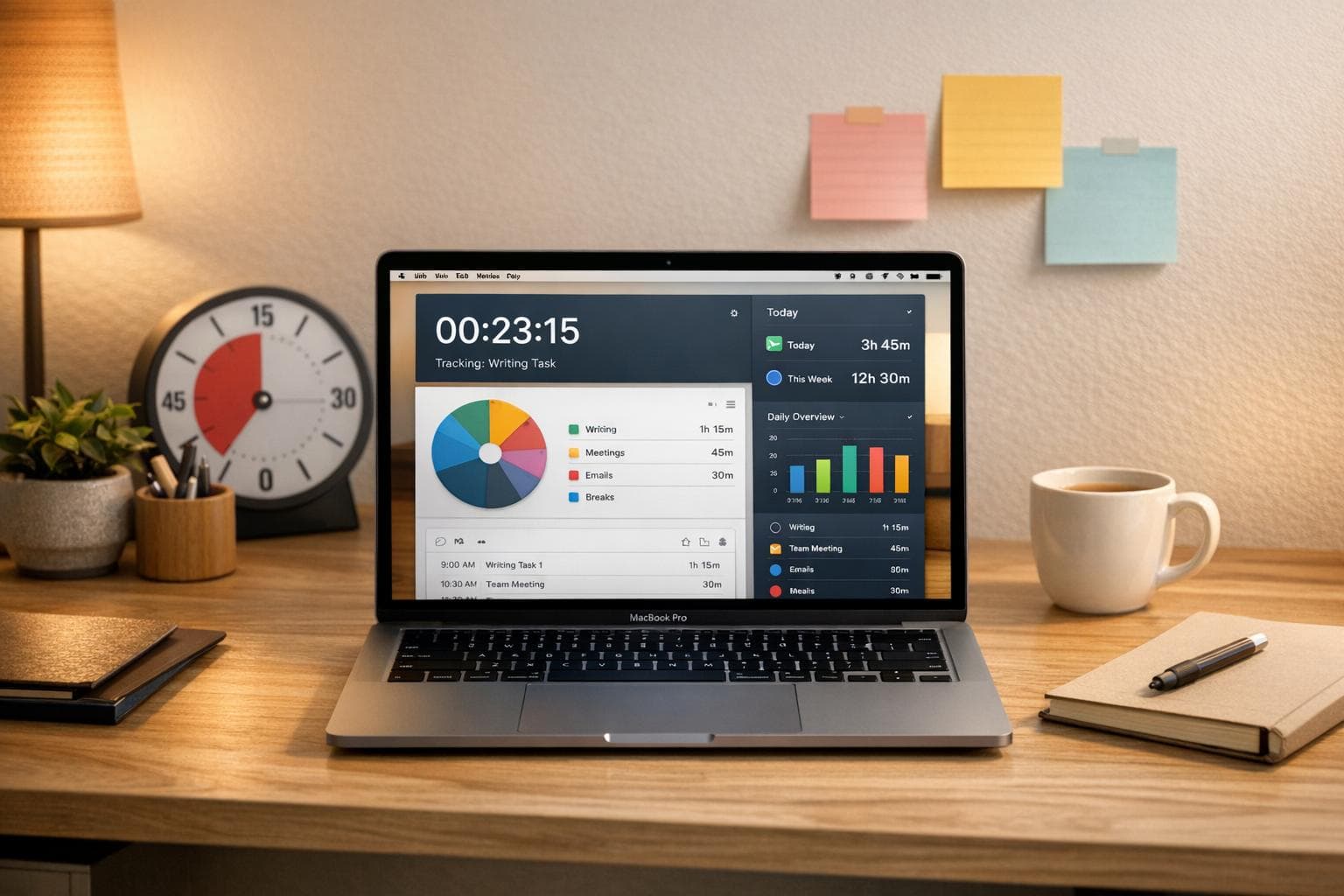
ADHD makes time management tough. Struggling with "time blindness", estimating task durations, and staying focused are common challenges. Time tracking tools on Mac can help by making time visible, reducing mental effort, and providing structure. Here’s how they work:
- Automatic tracking: Tracks your activity without manual input, saving effort.
- Visual reminders: Keep you focused and aware of goals.
- Periodic check-ins: Help you stay on track throughout the day.
- Data insights: Highlight patterns and distractions to improve habits.
With features like Pomodoro timers, distraction blocking, and visual timers, tools like Focusmo simplify time management for ADHD users. They help you focus, stay organized, and use your time more effectively.
ADHD and Time Management Challenges
ADHD Time Management Statistics and Productivity Challenges
Struggling with time management is a common hurdle for individuals with ADHD, often tied to what's known as time blindness. This refers to the difficulty in sensing time or accurately estimating how long tasks will take. It's not about laziness or lack of effort - it’s a neurological issue caused by reduced activity in the prefrontal cortex and disrupted dopamine signaling.
"Time blindness is not laziness or purposeful behavior... It is not willful. Time blindness is part and parcel of the executive function skills deficits."
- Dr. Geeta Grover, Developmental and Behavioral Pediatrician, UCI Health
For those with ADHD, time can feel like it's split into two categories: now and not now. Deadlines often seem distant until they’re right around the corner, leading to a last-minute scramble that can cause anxiety and overwhelm, often referred to as task paralysis. On the flip side, many find themselves stuck in a "waiting mode", where starting a task feels nearly impossible.
Then there’s hyperfocus - a double-edged sword. While it allows individuals to immerse themselves fully in stimulating tasks, it often comes at the expense of other responsibilities. Hours can slip away unnoticed, and less exciting tasks are left behind. For college students, maintaining focus ranks as one of their biggest struggles. Add in constant notifications and app-switching on devices like Macs, and working memory overload becomes even harder to manage.
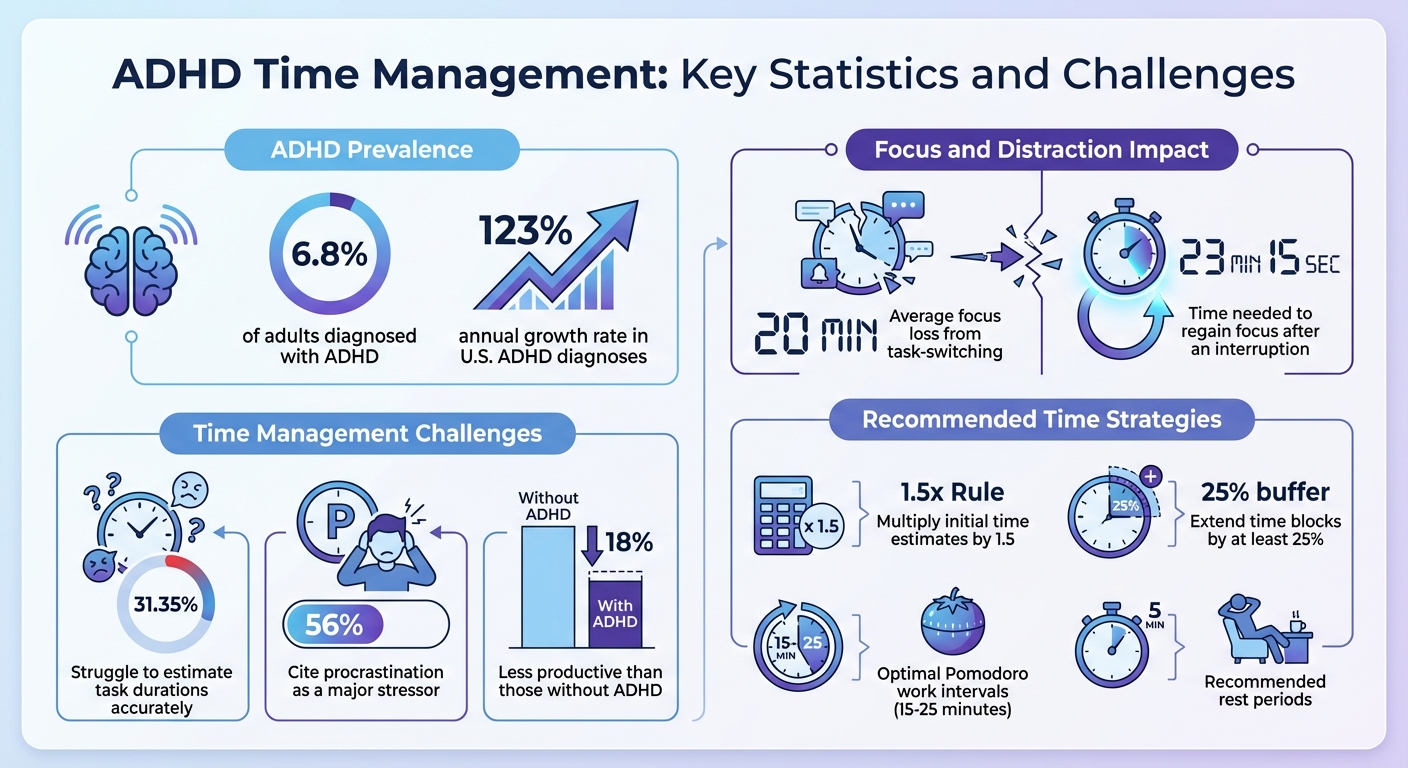
Experts suggest practical strategies such as extending time blocks by at least 25% to account for time blindness. Research also highlights that the brain regions responsible for time perception work differently in people with ADHD. These insights underline the importance of creating structured systems to make time more visible and easier to navigate.
How Time Tracking Helps ADHD Productivity on Mac
Time tracking transforms time into something tangible - a crucial benefit for those with ADHD. By showing exactly where your hours go, it helps build the awareness needed to make meaningful changes. The key is to pick tools that seamlessly fit into your workflow.
Automatic tracking reduces mental effort. Tools that quietly run in the background capture your activity without requiring constant input. As productivity expert Chris Cameron explains, "Logging tasks manually and setting timers that you must adhere to is a burden that nobody with ADHD should have to suffer".
Visual reminders keep you anchored to your goals. Features like floating task displays or menu bar indicators act as gentle nudges, helping you avoid the 20-minute focus loss that often comes with task-switching. Software engineer Aiden Thompson shares:
"I've been using Focusmo every day now. The blue waves in the banner really help me visualize time, especially when I am time blind. It really helps the ADHD brain".
Periodic check-ins provide accountability throughout the day. Hourly reminders bring you back on track before distractions take over. As Faye Campbell from motionapp.com puts it:
"It's just handy to have an accountability buddy to remind me: just do one thing, finish this one thing, do what you said you were going to do".
These automated features help combat time blindness and create a framework for structuring your day.
Building Time Awareness and Overcoming Time Blindness
Once you have a clear picture of how you spend your time, it becomes easier to tackle time blindness. Time tracking serves as an external memory, helping to map out your day and compensate for ADHD-related challenges with working memory.
Spotting the gap between estimated and actual time. Keeping a "Time Reality Log" lets you compare your expectations with reality. For example, about 31.35% of adults with ADHD struggle to estimate task durations accurately. By recognizing this pattern, you can apply the 1.5x Rule - multiplying your initial time estimate by 1.5 for a more realistic schedule.
Visual timers make time feel real. Countdown clocks create a sense of urgency, making the passage of time more concrete. Studies show that visual and physical stimuli are more effective for ADHD brains than abstract concepts of time.
Daily activity maps eliminate guesswork. Instead of wondering, "What did I even do today?" time tracking tools provide a clear breakdown of your Mac activity, giving you actionable insights.
Breaking Tasks into Smaller Intervals
Big, undefined tasks can feel overwhelming, but time tracking tools can help you break them into smaller, more manageable steps.
The Pomodoro Technique balances focus and rest. Working in 15–25 minute intervals with 5-minute breaks helps maintain intense concentration without burning out.
Micro-goals and the Five-Minute Bargain make starting easier. Instead of a vague goal like "Finish report", break it into smaller actions like "Open document" or "Write intro paragraph." Committing to just five minutes on a task can help overcome the inertia of getting started .
Time chunking with built-in buffers prevents overwhelm. Dividing large projects into 15–30 minute segments, with short breaks in between, helps account for transitions and unexpected interruptions. While adults with ADHD may be 18% less productive than those without, effective time chunking can help bridge that gap.
Using Data Insights to Build Better Habits
Once you've established a time tracking system, reviewing your data can help you refine your habits. These insights often reveal patterns you might miss in the moment.
Identify distraction triggers and impulsive behaviors. Tools like macOS Screen Time show which apps or websites derail your focus and how often you check notifications. Since over 56% of adults with ADHD cite procrastination as a major stressor, reducing these interruptions can significantly improve productivity.
Optimize your schedule based on energy levels. Tracking data can highlight when your focus is sharpest, allowing you to tackle demanding tasks during peak periods and save routine work for lower-energy times.
Weekly reviews help you fine-tune your approach. Setting aside time to review your tracking data ensures your categories remain simple enough to avoid adding cognitive strain. This process also helps you adjust your plans based on recurring patterns. The goal isn’t perfection - it’s about understanding your unique needs and working with, not against, your brain.
Setting Up Time Tracking on Mac: Step-by-Step Guide
Getting time tracking up and running on your Mac is straightforward, and doing it right can make a world of difference in maintaining focus.
Choosing the Right Time Tracking Tool
For those with ADHD, automatic tracking is a game-changer. Tools that require constant manual input, like clicking to start and stop timers, can break focus and feel like a chore. Automatic tracking, on the other hand, works quietly in the background, recording your activity without needing constant attention - a huge plus for ADHD users.
Another must-have feature is distraction blocking. The best tools combine tracking with website and app blocking, so you don’t have to juggle multiple apps. This way, when you start working, distractions like social media or news sites are automatically taken care of .
When setting up your tool, simplicity is key. Start with broader categories like "Work", "Communication", and "Breaks." Overloading your tracker with overly specific rules right away can feel overwhelming and counterproductive. You can always fine-tune these categories later during your weekly reviews.
Once you’ve chosen a tool with these features, it’s time to configure notifications and tracking settings.
Setting Up Time Tracking and Notifications
After installing your time tracking tool, adjust its settings to work smoothly with your routine. Begin by enabling automatic tracking. Once permissions are granted, the app should start capturing your activity right away.
Make sure to turn on idle detection. This feature automatically logs offline activities like calls or meetings, so you don’t have to worry about manually starting timers . When you return to your Mac, a simple prompt will let you categorize that time.
For added accountability, set up hourly check-ins. These gentle reminders help you stay aligned with your goals and pull you back on track if distractions start creeping in.
Enabling Distraction Blocking Tools
Once tracking and notifications are set, take it a step further by activating distraction-blocking features. Ideally, these blockers should kick in automatically when you begin a tracked session. Customize the list of blocked websites and apps - think social media, messaging apps, and other common distractions.
For tasks that require deep focus, consider enabling Hardcore Mode. This feature prevents you from ending a session early, helping you push through moments of impulsivity or resistance. While it might feel restrictive at first, it’s incredibly effective for staying on task when focus is critical.
You can also set up Pomodoro intervals to maintain a healthy work-rest balance. With this configuration, your tool will automatically alternate between work sessions and breaks. Distractions remain blocked during work intervals and are allowed during breaks, creating clear boundaries that keep you productive while avoiding burnout.
sbb-itb-8245ce4
Using Focusmo for ADHD Productivity on Mac
Focusmo is specifically designed to tackle the challenges that come with ADHD, offering tools like automatic tracking and visual cues to support better focus. By combining these features with built-in accountability, the app helps users manage daily struggles with executive function.
Setting Up Key Features for ADHD Support
To get started, enable hourly check-ins. These serve as gentle reminders, asking two simple questions: "What are you doing?" and "What's next?" This small prompt can help you refocus before distractions take over.
Next, activate the floating island feature. This keeps your current task pinned at the top of your screen, acting as a constant visual reminder even when you're switching between apps. Pair this with automatic activity logging to track your app and website usage effortlessly.
Another helpful tool is the blue waves visual indicator in your menu bar. This animated feature makes time more tangible, a crucial aid for those who struggle with time blindness. As Aiden Thompson, a software engineer, explains:
"The blue waves in the banner really help me visualize time, especially when I am time blind. It’s a constant reminder of my current task, and I always keep it visible."
With these features in place, you’ll be ready to dive into focused work sessions with ease.
Using Pomodoro Timers and Distraction Blocking
Once your setup is complete, you can initiate a Focus Session by selecting your current task and setting a duration. During the session, Focusmo automatically blocks distracting websites, helping you avoid the temptation of apps like Instagram or Slack - interruptions that can derail your focus for over 20 minutes.
To maintain a healthy balance, use Pomodoro intervals. These timers encourage regular breaks, preventing burnout from prolonged hyperfocus. Will Davidow, a web engineer, shares:
"The timer and break reminders have been incredibly effective. They’ve helped me organize tasks and manage my time better while ensuring I take necessary mental breaks."
For an even smoother experience, try the one-click momentum feature. This allows you to turn a logged activity into a protected focus block instantly, keeping you in the zone without the hassle of setting up a new session.
Reviewing Reports and Improving Your Habits
At the end of your day, check your automatic timeline to see exactly how your time was spent. This timeline shows which apps and websites were active during each session, helping you identify patterns of task drift. Compare your check-ins with your activity to pinpoint where you deviated from your plan.
Analyze your focus session durations to find your ideal work intervals. You can also identify distraction triggers by reviewing blocked sites you tried to access. Jessica Anderson, a university student with ADHD, shares her experience:
"I absolutely love using this app. It’s given me exactly what I’ve needed as a uni student with severe ADHD."
If you notice repeated attempts to visit social media, consider adding those sites to your permanent block list during work hours. Courtney Vickery, CEO of Declet Designs, appreciates the app’s tracking capabilities:
"It’s great to have a reference to look back at how I’m spending my time."
Use these daily insights to refine your workflow each week. If you're interested, Focusmo is currently offering a 50% anniversary discount, or you can start with the free version.
Conclusion
Time tracking isn’t just about recording hours - it’s about making time visible and workable for ADHD brains that often struggle with time blindness. With approximately 6.8% of adults diagnosed with ADHD and diagnoses in the U.S. growing at a rate of 123% per year, tools that simplify time management and ease mental strain are more important than ever.
Focusmo helps tackle these challenges by combining automatic tracking, visual reminders, hourly check-ins, and distraction-blocking features. It’s designed to support executive function without adding extra mental effort.
Once your system is set up, the data you track becomes a roadmap for daily improvements. Reviewing your timeline and focus session reports helps you spot patterns - like when distractions derail your work - and adjust your approach. Considering it takes an average of 23 minutes and 15 seconds to regain focus after an interruption, tools like distraction blockers and Pomodoro intervals aren’t just helpful - they’re essential.
Start simple: try one focus session. Focusmo offers a free 7-day trial, giving you a chance to explore how it fits your needs. The goal isn’t to achieve perfection but to develop habits that align with how your ADHD brain works. This small step can lay the groundwork for more intentional and focused productivity on your Mac.
Your time is already being spent. The real question is whether you’re spending it with purpose or letting it slip away unnoticed. By addressing time blindness, Focusmo equips you to take back control of your day - turning ADHD-related challenges into opportunities for meaningful productivity. Time tracking doesn’t just show you where your time goes - it gives you the tools to make it count.
FAQs
How can time tracking help individuals with ADHD manage time blindness?
Time tracking transforms the often abstract concept of time into something more concrete, which can be incredibly helpful for individuals with ADHD who experience time blindness. By providing a clear, visual representation of how time is spent, it becomes easier to understand how long tasks actually take. This not only helps in setting more realistic expectations but also keeps users on track with real-time reminders. The result? Better focus, less procrastination, and a greater sense of accountability.
What should I look for in a time tracking app to boost ADHD productivity?
When choosing a time tracking app to boost productivity with ADHD, look for features that make managing your time simple and stress-free. One key feature is automatic tracking, which logs your activity in the background without needing you to manually start or stop timers. A user-friendly interface with a clear visual layout of your tasks and schedule can also help reduce overwhelm and keep you organized.
Other useful features to consider include reminders or hourly check-ins to gently bring your attention back to your work, Pomodoro timers or time-blocking tools to break tasks into smaller, manageable chunks, and detailed activity reports to help identify patterns and refine your habits. Some apps even include distraction-blocking tools, such as muting notifications or restricting access to specific websites, to help you stay focused during work sessions.
Focusmo is a macOS app that combines all these ADHD-friendly features. It offers automatic tracking, task overviews, hourly prompts, Pomodoro timers, distraction-blocking tools, and detailed activity insights. Together, these tools work to lighten your mental load and keep you productive, giving you better control over your time and focus.
How can time tracking on Mac help me build better productivity habits, especially with ADHD?
Time tracking on your Mac can be a powerful way to sharpen your focus and build consistent productivity habits, especially if you’re navigating ADHD. By taking a closer look at how you spend your time, you can uncover patterns, set achievable goals, and create a structure that fits your needs.
Start by examining your daily or weekly activity logs to pinpoint when you’re most and least productive. This insight can guide you in setting practical goals, like cutting down on untracked time or dedicating specific blocks for focused work. Tools like Focusmo simplify the process with features like automatic time tracking, hourly check-ins, and Pomodoro timers. These tools help you stay on track and minimize distractions without adding extra work to your day.
Make it a habit to review your progress regularly and tweak your approach based on what your data shows. Over time, this cycle of tracking, evaluating, and fine-tuning can help you establish routines that enhance both your focus and productivity.