How to Track Your Time Without Feeling Overwhelmed
How to Track Your Time Without Feeling Overwhelmed
Struggle with time tracking? Many people, especially those with ADHD or packed schedules, find it challenging to log their activities consistently. Manual time-tracking tools often add stress, requiring constant input and decision-making. Distractions and time blindness further complicate the process, making it hard to stay focused or gauge how long tasks take.
The solution? Focusmo simplifies time tracking by automating the process. It monitors apps and websites in the background, eliminating the need for manual logging. Features like hourly check-ins, a floating task reminder, and customizable Pomodoro timers help you stay on track without feeling overwhelmed. Plus, distraction-blocking tools and an organized activity timeline provide clarity on how you spend your day.
Key Features of Focusmo:
- Automatic Tracking: Logs app and website usage without manual input.
- Hourly Check-Ins: Gentle reminders to refocus and plan next steps.
- Floating Island: Keeps your current task visible to reduce distractions.
- Customizable Pomodoro Timer: Tailors work and break intervals to your needs.
- Distraction Blocking: Prevents interruptions during focus sessions.
- Activity Timeline: Offers a clear overview of your day for better planning.
Focusmo’s tools are designed to reduce mental strain and help you spend your time more intentionally.
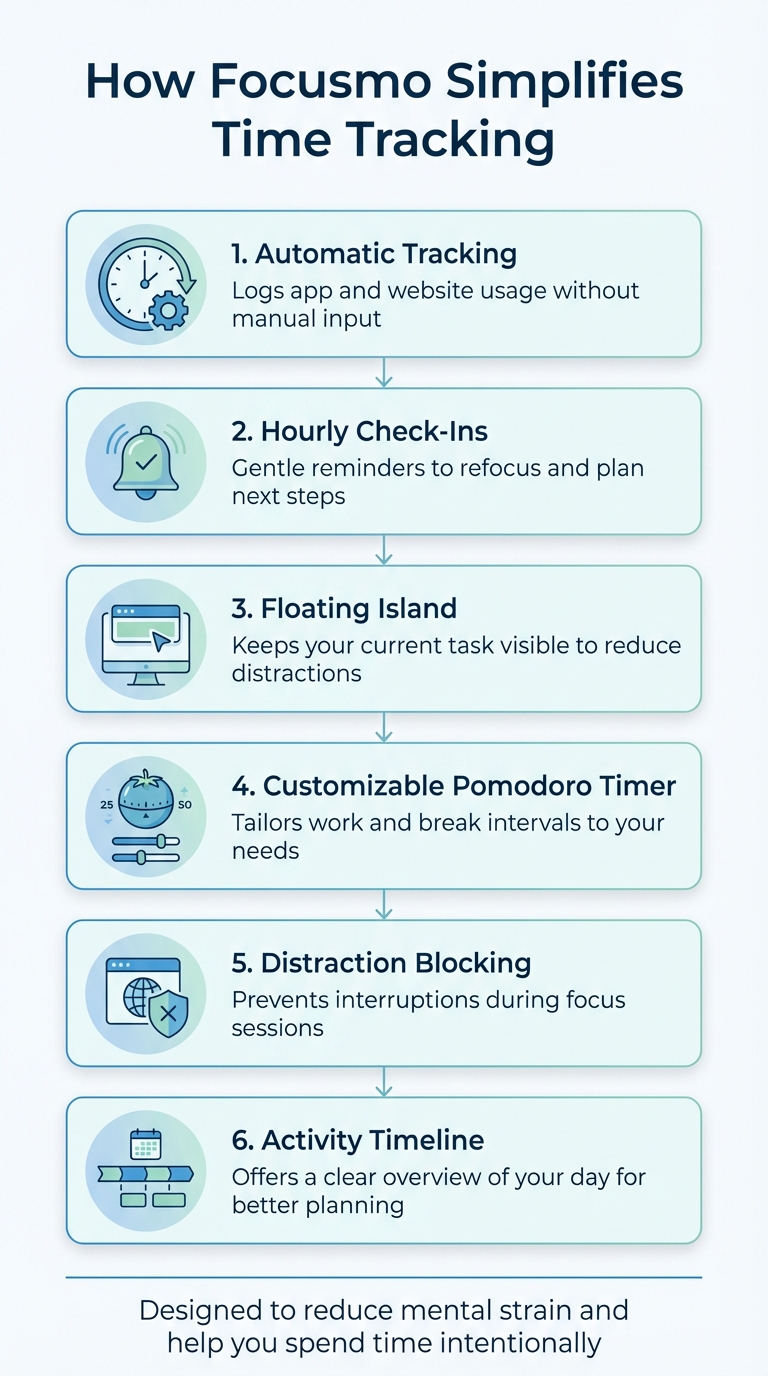
6 Key Features of Focusmo for Stress-Free Time Tracking
ADHD and Time Awareness: How Time Tracking Helps | Episode 286
sbb-itb-8245ce4
Turn On Automatic Time Tracking
The hardest part of manual time tracking isn’t analyzing your data - it’s remembering to log it in the first place. Every time you switch tasks, you have to stop one timer and start another. Forget to track something? You’ll end up piecing together your day from memory, which defeats the whole purpose of tracking.
Focusmo takes that hassle off your plate. With automatic tracking enabled, the app quietly monitors your apps and websites in the background, recording your activity without any input from you. There’s no timer to manage or buttons to press. It captures everything, letting you stay focused on what matters - your work.
Here’s how to set up automatic tracking on macOS in just a few steps.
Set Up Automatic Tracking on macOS
Now that you know how Focusmo’s automatic tracking works, let’s walk through setting it up on macOS. The process is quick and straightforward. When you install Focusmo, macOS will ask you to grant permissions - usually for Screen Recording or Accessibility access. These permissions allow the app to recognize which windows are active on your screen.
Once you’ve approved the necessary permissions, you’re good to go. Start a session or respond to an hourly check-in, and Focusmo will begin tracking automatically. The app links all tracking data to your active sessions, ensuring it only monitors your activity during your designated work periods.
Check Your Time Usage Without Effort
By the end of the day, Focusmo organizes your activity into a neat, chronological timeline. This timeline shows exactly how you spent your time - breaking down which apps or websites took up the most hours and how your actions aligned with your planned tasks.
This detailed overview helps you spot gaps between how you thought you’d spend your time and how you actually did. It’s a powerful tool for improving your planning and productivity. As Courtney Vickery, CEO of Declet Designs, puts it:
"A reference to look back at how I'm spending my time."
Customize Your Pomodoro Timer
For many people with ADHD, rigid schedules can sometimes feel more overwhelming than helpful. That’s where Focusmo’s Pomodoro timer comes in - it lets you tweak work and break intervals to suit your attention span and energy levels, making it easier to stay productive without added stress.
The trick is to align your timer with the task at hand. Tackling something daunting? Start with a shorter burst, like 15–20 minutes, to make it feel more approachable. For deep-focus activities, such as writing or programming, consider longer blocks of 45–50 minutes to hit that flow state without interruptions. As Will Davidow, a Web Engineer/Architect, puts it:
"The timer and break reminders have been extremely effective".
Adjust Timer Intervals to Match Your Needs
Focusmo gives you the flexibility to customize your work and break durations, tailoring them to how your brain operates. If you’re working on something mentally taxing that drains your energy quickly, shorter intervals of 15–20 minutes can help you avoid burnout. On the other hand, for tasks that demand sustained concentration - like coding or research - longer stretches of 45–50 minutes can keep you locked in.
The app also incorporates the classic four-session Pomodoro cycle: after completing four work intervals, you can take a longer break of 15–30 minutes. On a typical workday, most people manage between 8 and 12 Pomodoro sessions, so it’s smart to plan your schedule without overloading it.
Once you’ve tailored the intervals to your focus, you can set up reminders to keep everything running smoothly.
Gentle Reminders to Stay on Track
Focusmo uses full-screen alerts and visual cues to signal transitions between work and break periods, so there’s no need to keep checking the clock. This approach helps reduce what Focusmo calls "time pressure", where the fear of running over time can make it harder to concentrate fully.
The app also includes visual time indicators, such as blue waves in the banner, which show time passing in real-time. Aiden Thompson, a Software Engineer, highlights how helpful this feature is:
"The blue waves in banner really helps me visualize time especially when I am time blind, really helps the ADHD brain".
Use Hourly Check-Ins to Stay on Track
Time blindness has a sneaky way of making hours disappear. Hourly check-ins can help you stay grounded by prompting you to note your current task and plan your next steps. This simple habit not only lightens your mental load but also helps you avoid underestimating how much time tasks actually take.
Here’s how it works: every hour, you pause briefly to answer two simple questions - "What are you doing?" and "What’s next?" This quick reflection keeps you focused and intentional, rather than getting swept up by emails, notifications, or other distractions. These regular check-ins act like tiny resets, keeping you from veering too far off course. Let’s dive into how you can activate these hourly reminders.
Turn On Hourly Prompts
Focusmo makes hourly check-ins effortless with its built-in prompts. Once you enable this feature, the app gently reminds you every hour to log what you’re working on and what you plan to tackle next. This isn’t about micromanaging your time - it’s about staying present and aligned with your goals. As Faye Campbell from motionapp.com explains:
"It's just handy to have an accountability buddy to remind me: just do one thing, finish this one thing, do what you said you were going to do".
When you respond to the prompt, Focusmo automatically updates your activity log. This system is especially valuable when you consider that untracked tasks cost the US economy an estimated 50 million hours of productivity daily, translating to around $7.4 billion in lost work each day. By logging your progress in real time, you ensure your hours don’t slip away unnoticed.
Keep Tasks Visible with the Floating Island
After logging your task during a check-in, Focusmo displays it in a floating island at the top of your screen. This unobtrusive banner acts as a visual reminder, keeping your current task front and center without getting in your way. Why does this matter? Research shows it can take over 20 minutes to regain focus after an interruption. The floating island minimizes those disruptions by keeping your priorities visible, helping you stay locked in on what matters most.
Block Distractions and Review Your Activity
Distractions eat away at your time - every interruption can cost you over 20 minutes of focus. That’s why Focusmo pairs distraction blocking with automatic activity tracking. It not only shields your focus but also gives you a clear picture of where your time is actually going. Start by turning on distraction blocking to protect your focus.
Turn On Distraction Blocking
With just one click, you can activate distraction blocking and turn your activity log into a focused session. Focusmo automatically blocks distracting apps and websites, while keeping your current task visible in its floating island feature.
Software engineer Ishan Mandhan shared his experience:
"It's extremely effective in keeping me on track and not getting distracted by 20 different tasks".
This feature removes the need to rely solely on willpower, creating a barrier that keeps distractions at bay during your focus time. Once distractions are blocked, you can dive into reviewing your activity timeline for deeper insights.
Review Your Activity Timeline
Focusmo’s automatic tracking makes it easy to review your daily timeline and see exactly where your time went. Forget the hassle of manual logging - this tool provides a clear, judgment-free overview of your day.
Courtney Vickery, CEO of Declet Designs, appreciates this functionality, calling it:
"a reference to look back at how I'm spending my time".
When reviewing your timeline, look for patterns or moments where your focus drifted. Did you lose momentum after lunch? Are some tasks consistently taking longer than expected? Use these observations to fine-tune your schedule and set more realistic expectations. It’s not about being hard on yourself - it’s about learning how to make your time work better for you.
Adjust Focusmo to Match Your Work Style
Once you've streamlined your tracking and minimized distractions, it's time to fine-tune Focusmo so it aligns with how you work best.
We all have different work styles, and for individuals managing ADHD, personalization can make time tracking feel less like a chore and more like a natural part of the day. With a range of customization options, you can shape the app to fit your specific needs - whether you're handling multiple projects, managing ADHD-related challenges, or aiming to cut down on visual clutter. These tweaks can make tracking your time feel effortless, helping to reduce mental strain and keep overwhelm at bay.
Create Workspaces and Shortcuts
Workspaces are a great way to organize your projects and focus areas, especially if you find yourself juggling client work, personal tasks, and admin duties all in one day. By keeping each area separate, you can reduce the mental load of constantly switching contexts.
Shortcuts take this a step further by making your workflow even smoother. With custom shortcuts, you can quickly start focus sessions, switch between workspaces, or log tasks without missing a beat. Setting up shortcuts for your most frequent actions - like starting a timer or opening a specific workspace - helps you stay efficient and focused.
Next, let’s talk about how to optimize the app’s display and alerts to keep things clear and distraction-free, even on smaller screens.
Try Compact Mode and Custom Reminders
Compact Mode is perfect if you prefer a cleaner, less cluttered interface. It simplifies the layout by keeping your focus timer and task log easily accessible without overwhelming your workspace - a great option for smaller screens or minimalist setups. This feature ensures you can stay on top of your current task without unnecessary distractions.
Custom reminders allow you to control how and when Focusmo notifies you. For instance, you can schedule hourly check-ins to match your natural workflow, set full-screen alerts for meetings if those make you anxious, or adjust Pomodoro intervals to fit your focus stamina. The idea is simple: instead of forcing you to adapt, Focusmo molds itself around your preferences.
Conclusion
Time tracking doesn’t have to feel like another chore. Done right, it can actually lower stress and give you a better grip on your day.
Focusmo makes this process easier with features like automatic logging, hourly reminders, and customizable Pomodoro sessions. Its Floating Island ensures your current task stays in view without overwhelming your workspace.
The real game-changer? Personalization. Whether you’re navigating ADHD-related challenges or just aiming for a smoother workflow, you can tailor workspaces, shortcuts, and reminders to fit your needs. Compact Mode keeps distractions to a minimum, while the activity timeline offers clarity without judgment. With this setup, every minute works to boost your productivity.
FAQs
How does Focusmo track time automatically without needing manual updates?
Focusmo’s automatic tracking takes the hassle out of time management by eliminating the need for constant manual updates. Using advanced technology, it keeps track of your activities effortlessly, allowing you to stay focused on what matters most without the distraction of logging every action.
By observing your workflow and habits, Focusmo delivers precise insights into your time usage. This helps you maintain productivity and accountability - without adding any extra pressure.
Can I adjust the Pomodoro timer to match my workflow?
Yes, you can tweak the Pomodoro timer to match your work habits while sticking to its basic framework. The traditional setup includes 25-minute focus intervals paired with 5-minute breaks, plus a longer 15- to 30-minute break after completing four cycles. Many Pomodoro apps for Mac OS let you adjust these time blocks, giving you the freedom to craft a routine that fits your productivity flow. This customization makes it easier to stay focused and prevents burnout by balancing work and rest effectively.
How does Focusmo help reduce distractions and improve focus?
Focusmo provides tools aimed at reducing distractions and enhancing productivity without adding stress. Although the exact features aren't outlined in the available information, the platform is designed to foster a work environment that suits your preferences. With easy-to-use tools and practical strategies, Focusmo helps you stay focused and organized without feeling burdened.