
Settings Reference
The six settings pages and what lives on each — with defaults.
Open Settings with ⌘, or Preferences… in the menu bar menu. The sidebar has six pages — General, Timer, Appearance, Notifications, Integrations, and Account — and a search field that matches across every setting and jumps you straight to it.
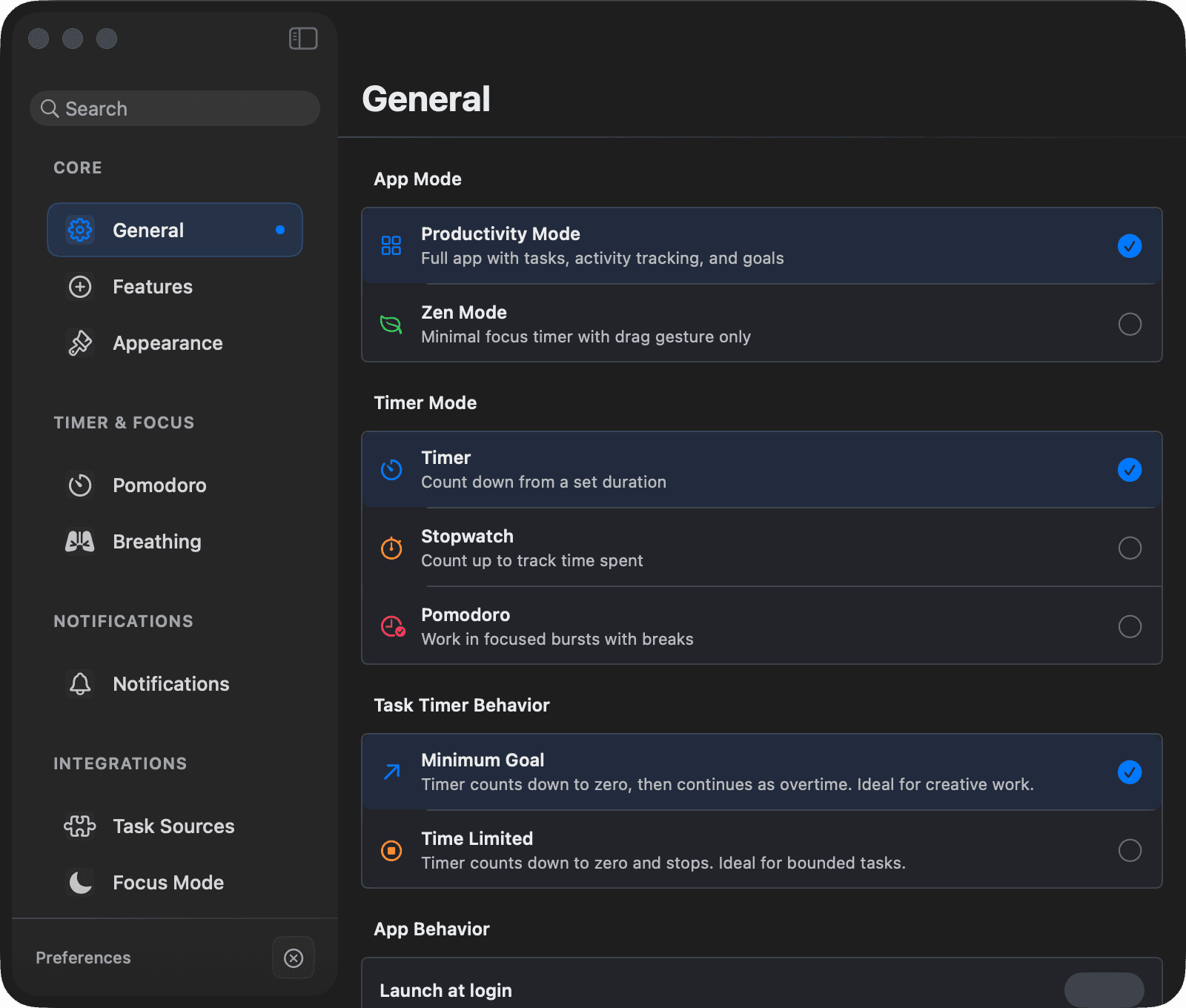
In Zen Mode only General, Timer, Appearance, and Account are shown, and the Timer page leaves out Breathing, Music, Check-ins, and Daily Focus Goal.
Looking for the old Features pane? It's gone — each switch now sits next to its settings. See Where Each Switch Lives Now.
General
How Focusmo starts, shows up, and keeps your tasks in order.
| Setting | Default |
|---|---|
| App Mode (Productivity / Zen) | Productivity |
| Launch at login | Off |
| Show reflection notes ("ask what you accomplished") | On |
| Show in Dock | On |
| Track activity only during focus sessions | Off |
| Automatically check for / download updates, Check for updates | On |
| Install updates when idle | On |
| Reset All Settings | — |
- Tasks — auto-delete completed (off), move completed to bottom (on), Daily Task Reset + reset time (Pro), default Project.
- Projects — Use projects, for Projects with blocking rules and apps to launch (Pro).
- Shortcuts — remap every global shortcut.
Timer
How a focus block runs: the mode, its length, breaks, and what happens around it.
- Mode — Timer Mode (Timer / Stopwatch / Pomodoro, default Timer) and Task Timer Behavior (Time Limited / Minimum Goal, default Time Limited). See Timer Modes.
- Pomodoro — work/break/long-break durations, session count, auto-start breaks. See Pomodoro. Presets are free; custom values are Pro.
- Breathing — pattern, minimum session length (default 10 min), cycles (default 2), mute, test. See Breathing Intro.
- Music — Music Sync: pause and resume your player with your sessions; the auto-start Focus Playlist is Pro.
- Focus Mode — the Do Not Disturb integration. Pro.
- Check-ins — Productivity Check-Ins: interval (default 30 min), daily limit (default 3), auto-dismiss (default 8 s), when they appear (default: focus sessions only).
- Daily Focus Goal — enable + target (default 2h). See Goals & Streaks.
Appearance
Theme, timer style, and the floating windows Focusmo can keep on screen.
| Setting | Default |
|---|---|
| Theme (System / Light / Dark) | System |
| Progress Style (Wave — animated / Linear — light on CPU) | Wave |
| Countdown Style (Normal / Digital Pro / Menu Bar / Minimal / Notch) | Normal |
| Digital display size | 50 px |
| Hide time display in floating timer | Off |
| Reset Minimal Timer Position | — |
| Click-Through Mode | Off |
| Haptic feedback | On |
| Timer colors (background, progress, pause, break, stopwatch, near-end, overtime) | Pro |
UI Controls — Show Floating Button, Auto Text Selection Menu (Drag Focus), Floating Island, Big Tasks Island. See Where Each Switch Lives Now.
Notifications
Alerts for sessions, breaks, meetings, and daily reminders.
- Notification Sounds master toggle (on by default).
- Visual effects — Edge glow, Overlay dimming, and Motion sliders.
- Per-type configuration for Overtime / Completed / Timer Finished / Break Time / Error: sound, frequency, and visual style. The edges style is free; border, full-screen, calendar, and center-drop styles are Pro.
- Full-screen break notifications (on by default).
- Presence cues — see Sounds & Notifications.
- Reminders — schedule daily reminder notifications (time, repeat days). Pro.
Integrations
Task managers, calendars, Reminders, and the tools that talk to Focusmo.
- Task Sources — Things 3, Reminders, TickTick, Todoist, and more, plus Pull and Complete behavior. See Integrations. Free on every plan.
- Apple Reminders — permission status and import options for the Apple Reminders integration.
- Calendar — Calendar Integration and Meeting Notifications switches, calendar selection, default calendar, calendars for the menu bar, and calendar notification style. See Calendar Events. Pro.
- Drag Focus — select text in any app and hold Fn to create a task from it.
- MCP Server — the Claude AI integration. Pro.
Account
Your license, support, privacy, and the switches most people never need.
- License — plan status, activation (Google sign-in or license key), device management; when signed in, Cross-Device Sync with Focusmo on iOS (off by default). See Free vs Pro.
- About — version, links (website, support), Manage License / Manage Devices, and the Share Usage Data toggle (see Privacy; opting out requires Pro).
- Sync & Data — Analytics, Cloud Sync ("Coming Soon"), Apple Reminders Integration, Music Sync, and Reset All Features.
Navigation shortcuts
| Shortcut | Section |
|---|---|
| ⌘1 | Focus |
| ⌘2 | Calendar |
| ⌘3 | Insights |
| ⌘4 | Projects |
| ⌘, | Settings |
| ⌘B | Show/hide backlog |
| ⇧⌘M | Show/hide main window |